- What nested while loops are — loops inside other loops
- Syntax and structure — writing proper nested loops
- Flowchart and execution — understanding inner and outer loop flow
- Pattern creation — building star, number, and letter patterns
- Multiplication tables — generating tables with nested loops
- Real-world applications — practical uses in data processing
- Best practices — avoiding common pitfalls
- Hands-on practice with the interactive editor
What is a Nested While Loop?
A nested while loop is a while loop inside another while loop. The inner loop runs completely for each iteration of the outer loop. This powerful programming construct allows you to work with multi-dimensional data, create patterns, and solve complex problems that require multiple levels of iteration.
💡 Key insight: Think of nested loops like a clock. The outer loop is the hour hand (slow), and the inner loop is the minute hand (fast). The minute hand completes a full cycle for each hour. Similarly, the inner loop completes all its iterations for each iteration of the outer loop.
Consider a classroom with rows and columns. The outer loop goes through each row, and the inner loop goes through each column in that row. This is exactly how nested loops work - they process multi-dimensional structures efficiently.
Nested While Loop Syntax
The syntax of a nested while loop is straightforward - simply place one while loop inside another:
# Syntax
while outer_condition:
    # Outer loop body
    while inner_condition:
        # Inner loop body
        # This runs completely for each outer iteration

    # After inner loop completes, outer loop continues

# Example: Simple nested while loop
row = 1
while row <= 3:
    col = 1
    while col <= 3:
        print(f"({row},{col})", end=" ")
        col += 1
    print()  # New line after each row
    row += 1

# Output:
# (1,1) (1,2) (1,3)
# (2,1) (2,2) (2,3)
# (3,1) (3,2) (3,3)
📖 Important: The inner loop must be properly indented inside the outer loop. Each loop has its own condition and its own counter variable. The inner loop runs to completion for each iteration of the outer loop.
Flowchart & Execution Flow
Understanding the flow of nested loops is crucial for writing correct code:
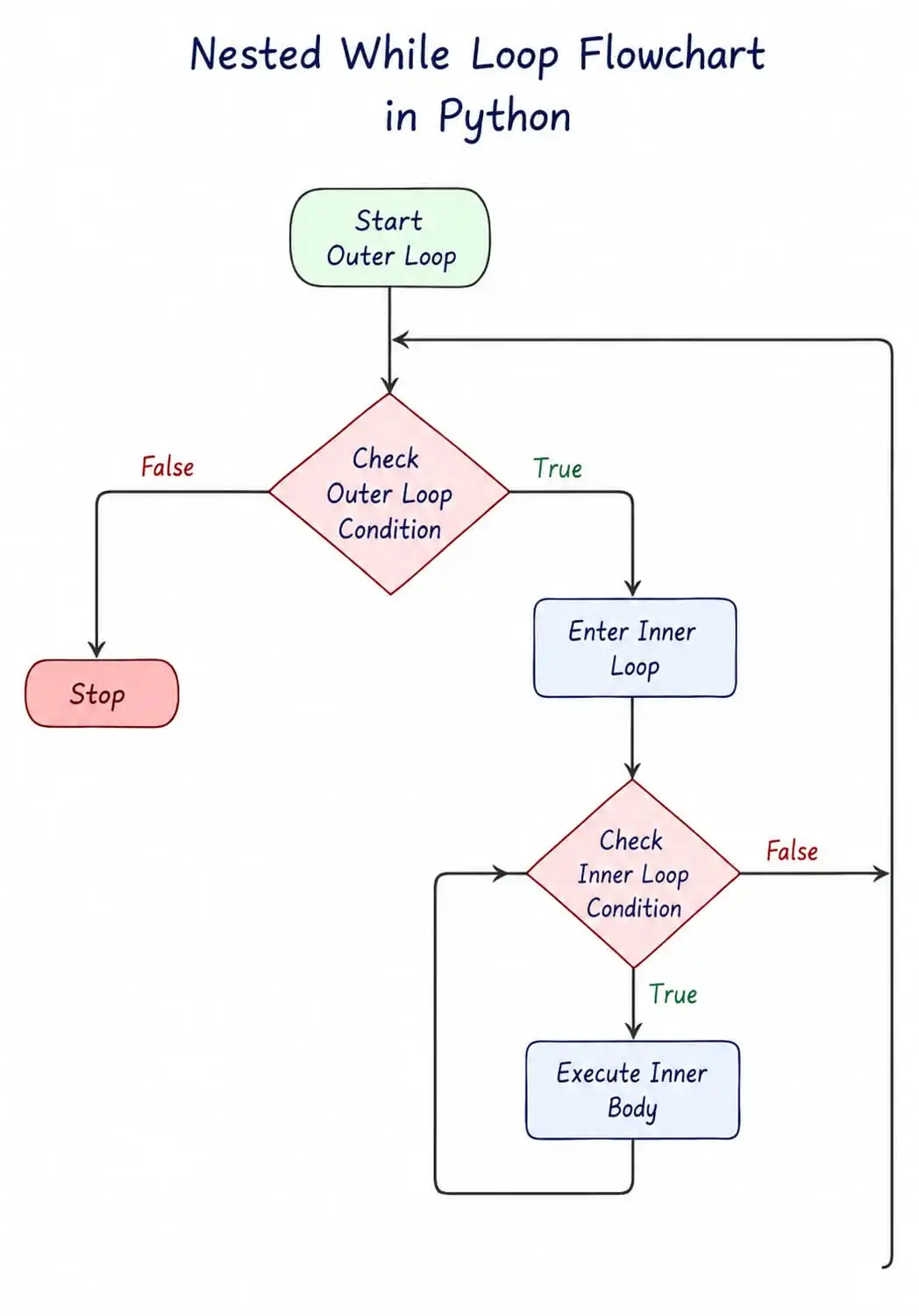
Step-by-step execution:
- Outer loop checks its condition
- If
True, it enters and executes the outer body - Inside the outer body, the inner loop checks its condition
- If
True, the inner loop body executes completely - The inner loop repeats until its condition becomes
False - Control returns to the outer loop, which continues
- This process repeats until the outer condition becomes
False
Nested While Loop Examples
Let's explore various examples of nested while loops:
# Example 1: Simple nested loop - 3x3 grid
row = 1
while row <= 3:
    col = 1
    while col <= 3:
        print(f"({row},{col})", end=" ")
        col += 1
    print()
    row += 1
# Output: 3x3 grid of coordinates

# Example 2: Sum of elements in a matrix
matrix = [[1, 2, 3], [4, 5, 6], [7, 8, 9]]
row = 0
total = 0
while row < len(matrix):
    col = 0
    while col < len(matrix[row]):
        total += matrix[row][col]
        col += 1
    row += 1
print(f"Total sum: {total}")
# Output: Total sum: 45

# Example 3: Find maximum in matrix
matrix = [[3, 8, 1], [12, 5, 9], [7, 2, 4]]
row = 0
max_val = matrix[0][0]
while row < len(matrix):
    col = 0
    while col < len(matrix[row]):
        if matrix[row][col] > max_val:
            max_val = matrix[row][col]
        col += 1
    row += 1
print(f"Maximum value: {max_val}")
# Output: Maximum value: 12
Creating Patterns with Nested Loops
Nested loops are perfect for creating visual patterns. Here are some common patterns:
# Pattern 1: Right Triangle of Stars
# *
# **
# ***
# ****
# *****
row = 1
while row <= 5:
    col = 1
    while col <= row:
        print("*", end="")
        col += 1
    print()
    row += 1

# Pattern 2: Inverted Right Triangle
# *****
# ****
# ***
# **
# *
row = 5
while row >= 1:
    col = 1
    while col <= row:
        print("*", end="")
        col += 1
    print()
    row -= 1

# Pattern 3: Number Triangle
# 1
# 1 2
# 1 2 3
# 1 2 3 4
# 1 2 3 4 5
row = 1
while row <= 5:
    col = 1
    while col <= row:
        print(col, end=" ")
        col += 1
    print()
    row += 1

# Pattern 4: Pyramid Pattern
#     *
#    ***
#   *****
#  *******
# *********
row = 1
while row <= 5:
    # Print spaces
    space = 1
    while space <= 5 - row:
        print(" ", end="")
        space += 1
    # Print stars
    star = 1
    while star <= (2 * row - 1):
        print("*", end="")
        star += 1
    print()
    row += 1
Multiplication Table with Nested Loops
Generating a multiplication table is a classic use case for nested loops:
# Multiplication Table (1 to 10)
row = 1
while row <= 10:
    col = 1
    while col <= 10:
        print(f"{row * col:4}", end="")
        col += 1
    print()
    row += 1

# Output:
#    1   2   3   4   5   6   7   8   9  10
#    2   4   6   8  10  12  14  16  18  20
#    3   6   9  12  15  18  21  24  27  30
#    ... etc ...

# Specific table for a number
num = int(input("Enter a number: "))
i = 1
while i <= 10:
    print(f"{num} × {i} = {num * i}")
    i += 1

# Output:
# 5 × 1 = 5
# 5 × 2 = 10
# 5 × 3 = 15
# ... etc ...
Real-World Use Cases
💡 Use Case 1: Student Marks Matrix
# Student marks for 3 subjects (5 students)
marks = [
    [85, 90, 78],
    [92, 88, 95],
    [76, 82, 89],
    [91, 87, 93],
    [88, 94, 80]
]

# Calculate average for each student
student_num = 1
while student_num <= len(marks):
    subject_sum = 0
    subject = 0
    while subject < len(marks[student_num - 1]):
        subject_sum += marks[student_num - 1][subject]
        subject += 1
    average = subject_sum / len(marks[student_num - 1])
    print(f"Student {student_num} average: {average:.2f}")
    student_num += 1
💡 Use Case 2: Image Pixel Processing
# Simulate pixel processing (grayscale image)
image = [
    [120, 150, 180, 200],
    [100, 130, 160, 190],
    [80, 110, 140, 170],
    [60, 90, 120, 150]
]

# Apply brightness filter (increase by 20%)
row = 0
while row < len(image):
    col = 0
    while col < len(image[row]):
        # Apply filter
        image[row][col] = min(255, int(image[row][col] * 1.2))
        col += 1
    row += 1

# Print processed image
row = 0
while row < len(image):
    col = 0
    while col < len(image[row]):
        print(f"{image[row][col]:3}", end=" ")
        col += 1
    print()
    row += 1
💡 Use Case 3: Sales Data Analysis
# Quarterly sales data (4 quarters, 3 products)
sales = [
    [25000, 31000, 28000],  # Q1
    [29000, 34000, 32000],  # Q2
    [32000, 38000, 35000],  # Q3
    [28000, 33000, 30000]   # Q4
]

# Find total sales and best quarter
quarter_num = 1
best_quarter = 1
best_total = 0

while quarter_num <= len(sales):
    product = 0
    quarter_total = 0
    while product < len(sales[quarter_num - 1]):
        quarter_total += sales[quarter_num - 1][product]
        product += 1
    print(f"Q{quarter_num} Total Sales: ₹{quarter_total}")
    if quarter_total > best_total:
        best_total = quarter_total
        best_quarter = quarter_num
    quarter_num += 1

print(f"\nBest Quarter: Q{best_quarter} with ₹{best_total}")
Best Practices & Pitfalls
⚠️ Common Pitfalls
- Forgetting to update inner loop counter
- Using the same variable for both loops
- Not resetting inner loop counter
- Creating infinite nested loops
- Too many nested levels (3+ levels)
✅ Best Practices
- Use meaningful variable names
- Reset inner counter before inner loop
- Keep nesting to 2-3 levels max
- Add comments explaining logic
- Test with small numbers first
💡 Optimization Tips
- Use break to exit early
- Consider performance for large data
- Use list comprehensions when possible
- Cache length values
- Pre-compute when possible
Try It Yourself!
Experiment with nested while loops directly in your browser. Modify the code and see the results in real time.
NESTED WHILE LOOP DEMONSTRATION
========================================
1. BASIC NESTED LOOP (3x3 Grid)
(1,1) (1,2) (1,3)
(2,1) (2,2) (2,3)
(3,1) (3,2) (3,3)
2. RIGHT TRIANGLE PATTERN
*
**
***
****
*****
3. MULTIPLICATION TABLE (5x5)
1 2 3 4 5
2 4 6 8 10
3 6 9 12 15
4 8 12 16 20
5 10 15 20 25
4. NUMBER TRIANGLE
1
1 2
1 2 3
1 2 3 4
1 2 3 4 5
5. SUM OF MATRIX
Total sum: 45
✅ Explore nested loops!
🎉 You've Learned Python Nested While Loops!
You understand nested while loop syntax, patterns, multiplication tables, and real-world applications. These are essential for complex data processing!
Quick Quiz – Test Your Knowledge
Let's see what you've learned about nested while loops:
Frequently Asked Questions
🤔 How many levels of nested loops should I use?
🔧 Why is my inner loop not resetting?
📐 Can I use break in nested loops?
break statement only exits the innermost loop it's in. To exit multiple levels, you need to use flags or labels (Python doesn't have labels, so use a flag variable to break out of all loops).
📊 What are the performance implications of nested loops?
⚡ Can I nest a while loop inside a for loop?
while loop can be nested inside a for loop, and vice versa. This flexibility allows you to use the best loop type for each level of iteration.
🎯 What's a real-world example of nested loops?
📚 Where to Go From Here
Now that you've mastered nested while loops, here are the next topics to explore:
📝 While Loop Assignments
Practice while loops with coding challenges.
Practice →🔄 The for Loop
Master the for loop and compare it with while loops.
Learn More →🔄 Nested For Loop
Learn about nested for loops and their applications.
Learn More →