Python

P
PythonHub
Progress 0%

Python

  • Home
  • History of Python
  • Applications of Python
  • Introduction To Python
    • What is Python
    • Character Set
    • Tokens in Python
    • Python Execution Mode
    • Variable And Identifiers
    • Data Types in Python
    • Operators And Expressions
    • Constants in Python
    • Assignment Statement
    • Input / Output in Python
    • Simple Python Scripts
    • Namespace in Python
    • šŸ“ Assignments
  • Operators in Python
    • Arithmetic Operators
    • Assignment Operators
    • Shorthand Assignment Operators
    • Relational Operators
    • Logical Operators
    • Bitwise Operators
    • Special Operators
    • šŸ“ Assignments
  • Input Output in Python
    • Accept Input
    • Output Formatting
    • šŸ“ Assignments
  • Conditional Statement
    • Decision Making
    • if Statement
    • IF-ELSE STATEMENT
    • IF-ELSE LADDER
    • NESTED IF-ELSE
    • Short Hand IF-ELSE
    • šŸ“ Assignments
  • Loops
    • Introduction to Loops
    • While Loop
    • Nested While Loop
    • šŸ“ While Loop Assignments
    • For Loop
    • For Loop Examples
    • Nested For Loop
    • Nested For Loop Examples
    • Infinite While Loops
    • Infinite For Loops
    • Break, Continue and Else in Loops
    • Difference Between For and While Loop
    • For Each Loop
    • šŸ“ For Each Assignments
    • šŸ“ All Loops Assignments
  • List
    • List in Python
    • Access List Elements
    • List Functions
    • Iterate (Loop) List
    • List Comprehension
    • šŸ“ Assignments
  • Tuple
    • Tuple in Python
    • Access Tuple Elements
    • Tuple Functions
    • Iterate (Loop) Tuple
    • Unpack Tuple
    • Tuple Comprehension
    • šŸ“ Assignments
  • Set
    • Set in Python
    • Access Set Elements
    • Set Methods
    • Iterate (Loop) Set
    • Pack/Unpack Set
    • Set Comprehension
    • šŸ“ Assignments
  • Dictionary
    • Dictionary
    • Access Dictionary Items
    • Dictionary Methods
    • Iterate (Loop) Dictionary
    • Formatting Dictionaries
    • Nested Dictionaries
    • Dictionary Comprehension
    • šŸ“ Assignments
  • Diff List Tuple Set Dictionary
    • List vs Tuple
    • List vs Set
    • List vs Dictionary
    • Tuple vs Set
    • Tuple vs Dictionary
    • Dictionary vs Set
    • šŸ“ Assignments
  • Exception
    • Error vs Exception
    • Exception Handling
    • Types of Exception
    • User Defined Exception
    • Logging Exception
    • šŸ“ Assignments
  • Functions
    • Introduction to Functions
    • Modular Programming
    • Types of Functions
    • Inbuilt Functions
    • Need For User-Defined Function
    • Elements of User Defined Function
    • Function Arguments
    • Nesting of Functions
    • Recursion
    • Global Local and Non Local
    • Python Lambda Functions
    • šŸ“ Assignments
  • Python Module
    • Introduction to Module
    • Inbuilt Modules in Python
    • User Defined Module
    • šŸ“ Assignments
  • File Handling
    • Introduction to Files
    • Create File
    • Read Files
    • Write to File
    • Rename File
    • Copy File
    • Move File
    • List Files in Directory
    • Binary Files
    • Zipping and Unzipping Files
    • šŸ“ Assignments
  • Strings
    • Basics of Strings
    • String Special Operators
    • String Formatting Operators
    • String Methods
    • šŸ“ Assignments
  • Regular Expressions
  • Python OOPS
    • Basics of Object Oriented
    • What are Classes and Objects?
    • Creating Class and Object
    • OOP vs Procedural Programming
    • Difference Between Classes and Objects
    • Constructors
    • Destructor
    • Built Class Methods and Attributes
    • Class and Instance Variables
    • Inheritance in Python
    • Single Inheritance
    • Multiple Inheritance
    • Multilevel Inheritance
    • Hierarchical Inheritance
    • Hybrid Inheritance
    • Abstraction
    • Method Overriding
    • Abstract Method
    • Interfaces in Python
    • Abstract Class vs Interface
    • Public, Private and Protected
    • Overloading vs Overriding
    • Inheritance vs Composition
    • Encapsulation
    • Polymorphism
    • Inner Classes
    • šŸ“ Assignments
  • Advanced Python
    • Iterator in Python
    • Generator in Python
    • Decorator in Python
    • Type Hints in Python
    • Async/Await Programming
    • Dataclasses in Python
    • Context Managers in Python
    • Property Decorator in Python
    • __slots__ in Python
    • Enums in Python
    • Walrus Operator in Python
    • Match-Case in Python
    • šŸ“ Assignments
  • Python Standard Library
    • Collections Module
    • Itertools Module
    • Functools Module
    • Datetime Module
    • JSON Module
    • OS Module
    • Sys Module
    • Random Module
    • Math Module
    • šŸ“ Assignments
  • Python Testing
    • Unit Testing in Python
    • Pytest Framework
    • Mocking in Python
    • šŸ“ Assignments
  • Python Best Practices
    • PEP 8 Style Guide
    • Docstrings in Python
    • Logging in Python
    • Code Optimization Tips
    • Debugging Techniques
    • šŸ“ Assignments
  • MySQL Database in Python
    • Introduction to MySQL with Python
    • DBMS vs File System
    • Connecting to MySQL Database
    • Create Database in MySQL
    • Create Table in MySQL
    • Insert Data in MySQL
    • Insert Multiple Rows
    • Select Data from MySQL
    • WHERE Clause in MySQL
    • Update Data in MySQL
    • Delete Data from MySQL
    • Parameterized Queries
    • Transaction Management
    • Error Handling
    • Connection Pooling
    • MySQL Drivers Guide
    • Joins in MySQL
    • Aggregation Functions
    • Backup MySQL Database
    • Best Practices
    • šŸ“ Assignments
  • MySQL Database Operations
    • SELECT Statement
    • MySQL Operators
    • DDL Statements
    • DML Statements
    • Subqueries
    • JOIN Operations
    • Aggregation
    • Case Study
    • šŸ“ Assignments
  • Graphics in Python
  • Threads in Python
    • Introduction to Threads
    • Process vs Threads
    • Concurrent Programming & GIL
    • Uses of Threads
    • Creating Threads
    • Single Tasking
    • Multi Tasking
    • Thread Synchronization
    • šŸ“ Assignments
  • Interview Questions & Answers
  • Python Case Studies
  • Multiple Choice Questions
  • šŸ“ Practice Problems
Get in Touch
  • tech2dsm@gmail.com

© Sankalan Data Tech

Python Language Interactive Tutorial

šŸ“ Python Conditional Statements: Practice Assignments

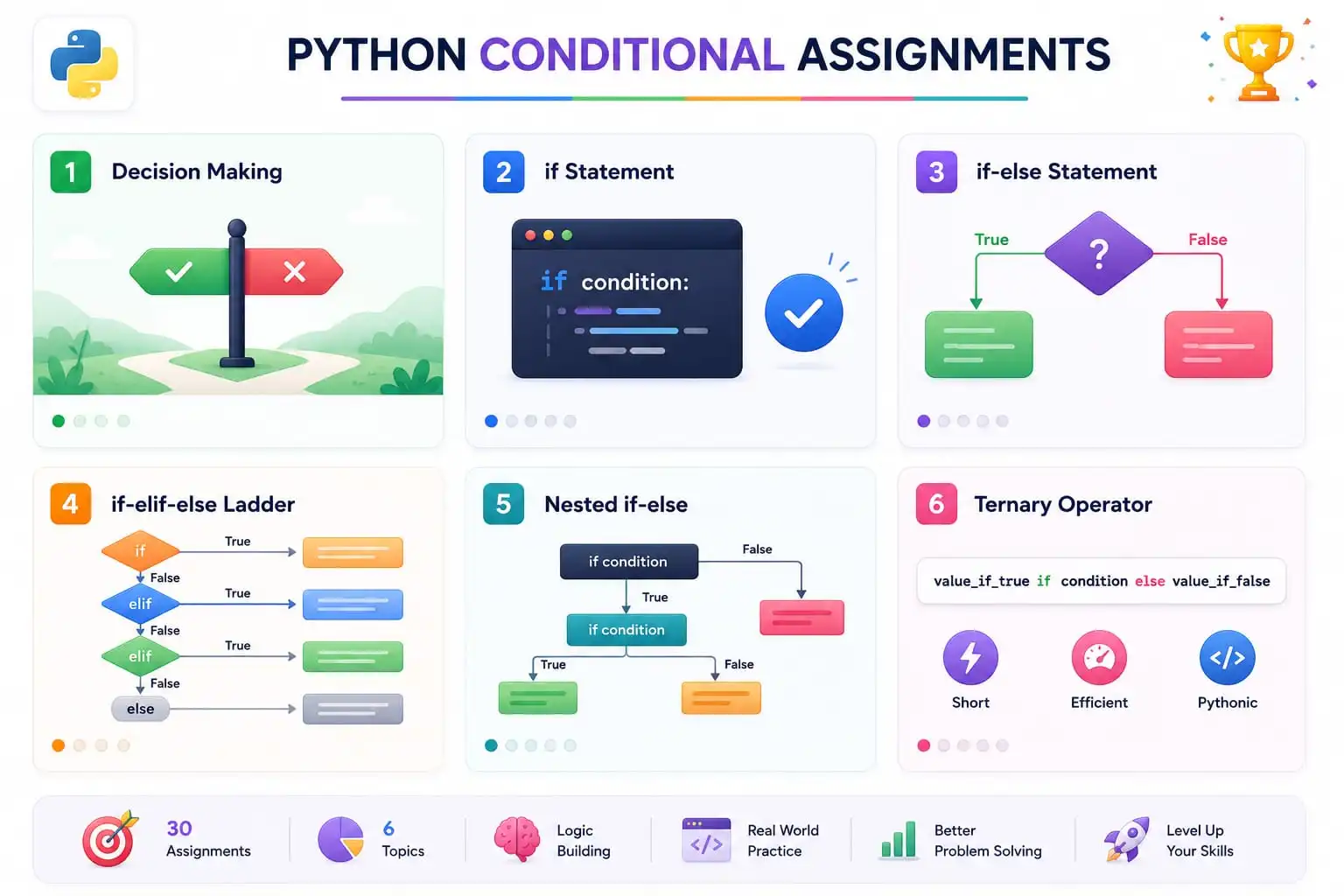
Python Conditional Statements Practice Assignments

Practice makes perfect — master conditional statements with these real-world problems.

Created by Sankalan Data Tech Team Verified
Data Engineers, Analysts, Scientists & Trainers
Created by experienced Python developers, data engineers, and data scientists to make programming easy through practical examples, real-world experience, and clear explanations.
šŸ“‘ On this page:
  • About These Assignments
  • Decision Making
  • if Statement
  • if-else Statement
  • if-elif-else Ladder
  • Nested if-else
  • Ternary Operator
  • Mixed Practice
  • Try It Yourself
Share this tutorial:
Twitter LinkedIn Facebook WhatsApp Reddit Telegram Email Copy Link

About These Assignments

This page contains 30+ practice assignments covering all conditional statement topics in Python. Each problem is categorized by topic and difficulty:

🟢 Beginner 🟠 Intermediate šŸ”“ Advanced

šŸ’” Tip: Try solving each problem on your own first. Click the "Show Solution" button only after you've attempted the problem. This approach will help you learn more effectively.

1. Decision Making 4 Questions

šŸŽÆ Learning Goal: Understand the fundamentals of decision making in Python — the foundation of all conditional statements.
Beginner Decision Making Q1: Check if a number is positive
Scenario: You're building a number classifier. Write a program that checks if a given number is positive.
šŸ’” Solution:
num = 10
if num > 0:
print(f"{num} is positive")
# Output: 10 is positive
šŸ“– Explanation:

This simple if statement checks if the number is greater than 0. If true, it prints the message. This is the foundation of all decision-making in Python.

Intermediate Decision Making Q2: Grade classification
Scenario: You're building a grading system. Classify a score as "Pass" if ≄ 40, otherwise "Fail".
šŸ’” Solution:
score = 75
if score >= 40:
print("Pass")
else:
print("Fail")
# Output: Pass
šŸ“– Explanation:

This demonstrates two-way decision making. If the score is 40 or above, the student passes. Otherwise, they fail. This is a common pattern in grading systems.

Advanced Decision Making Q3: ATM withdrawal system
Scenario: You're building an ATM system. Check if withdrawal amount is valid (less than balance, greater than 0, multiple of 100).
šŸ’” Solution:
balance = 5000
amount = 3000
if amount > balance:
print("Insufficient balance!")
elif amount <= 0:
print("Invalid amount!")
elif amount % 100 != 0:
print("Amount must be multiple of 100")
else:
balance -= amount
print(f"Withdrawal successful! Balance: ₹{balance}")
# Output: Withdrawal successful! Balance: ₹2000
šŸ“– Explanation:

This demonstrates multiple condition checks using if-elif-else. Each condition handles a different validation rule — balance check, amount validity, and withdrawal limits.

Beginner Decision Making Q4: Check if a number is divisible by 5
Scenario: You're building a number classifier. Write a program that checks if a given number is divisible by 5.
šŸ’” Solution:
num = 25
if num % 5 == 0:
print(f"{num} is divisible by 5")
# Output: 25 is divisible by 5
šŸ“– Explanation:

The modulus operator % checks if the remainder when divided by 5 is 0. If true, the number is divisible by 5.

2. if Statement 5 Questions

šŸŽÆ Learning Goal: Master the if statement — conditional execution based on a single condition.
Beginner if Statement Q5: Check voting eligibility
Scenario: You're building a voting system. Check if a person is eligible to vote (age ≄ 18).
šŸ’” Solution:
age = 20
if age >= 18:
print("Eligible to vote!")
# Output: Eligible to vote!
šŸ“– Explanation:

The if statement checks if the age is 18 or above. If true, it prints the eligibility message. If false, nothing happens. This is the simplest form of conditional execution.

Beginner if Statement Q6: Check if a number is even
Scenario: You're building a number puzzle game. Check if a given number is even using the modulus operator.
šŸ’” Solution:
num = 8
if num % 2 == 0:
print(f"{num} is even")
# Output: 8 is even
šŸ“– Explanation:

The modulus operator % checks if the number is divisible by 2. If the remainder is 0, the number is even. This is a common use of the if statement with arithmetic operators.

Intermediate if Statement Q7: Password validation
Scenario: You're building a login system. Check if the password length is at least 8 characters.
šŸ’” Solution:
password = "secure123"
if len(password) >= 8:
print("Password is valid!")
# Output: Password is valid!
šŸ“– Explanation:

The len() function returns the length of the string. The if statement checks if it's at least 8 characters. This is a common pattern in form validation.

Intermediate if Statement Q8: Check if a character is a vowel
Scenario: You're building a text analyzer. Check if a given character is a vowel (a, e, i, o, u).
šŸ’” Solution:
char = 'a'
if char in 'aeiouAEIOU':
print(f"{char} is a vowel")
# Output: a is a vowel
šŸ“– Explanation:

The in operator checks if the character exists in the string of vowels. This is a common pattern in text analysis.

Advanced if Statement Q9: Check if a number is a multiple of 3 and 5
Scenario: You're building a FizzBuzz game. Check if a number is divisible by both 3 and 5.
šŸ’” Solution:
num = 15
if num % 3 == 0 and num % 5 == 0:
print(f"{num} is divisible by both 3 and 5")
# Output: 15 is divisible by both 3 and 5
šŸ“– Explanation:

This uses the logical operator and to check both conditions simultaneously. The number must be divisible by both 3 and 5.

3. if-else Statement 5 Questions

šŸŽÆ Learning Goal: Master the if-else statement — two-way decision making.
Beginner if-else Q10: Check if a number is even or odd
Scenario: You're building a number classifier. Determine if a number is even or odd.
šŸ’” Solution:
num = 7
if num % 2 == 0:
print(f"{num} is even")
else:
print(f"{num} is odd")
# Output: 7 is odd
šŸ“– Explanation:

The if-else statement provides two paths. If the number is divisible by 2, it's even. Otherwise, it's odd. This handles all possible cases.

Intermediate if-else Q11: Discount calculator
Scenario: You're building an e-commerce system. Apply 10% discount if total is over ₹500, otherwise no discount.
šŸ’” Solution:
total = 600
if total > 500:
discount = total * 0.10
final = total - discount
print(f"Discount: ₹{discount}, Final: ₹{final}")
else:
print(f"Final: ₹{total}")
# Output: Discount: ₹60.0, Final: ₹540.0
šŸ“– Explanation:

This demonstrates using if-else for business logic. If the total is over 500, a 10% discount is applied. Otherwise, the full amount is charged.

Advanced if-else Q12: Employee bonus system
Scenario: You're building a payroll system. Award 10% bonus if performance rating ≄ 4, otherwise no bonus.
šŸ’” Solution:
salary = 50000
rating = 4.5
if rating >= 4:
bonus = salary * 0.10
print(f"Bonus: ₹{bonus}")
else:
print("No bonus")
# Output: Bonus: ₹5000.0
šŸ“– Explanation:

This shows how if-else is used in HR systems. Based on performance rating, the employee either receives a bonus or not.

Beginner if-else Q13: Check if a number is positive, negative, or zero
Scenario: You're building a number classifier. Determine if a number is positive, negative, or zero.
šŸ’” Solution:
num = -5
if num > 0:
print("Positive")
elif num < 0:
print("Negative")
else:
print("Zero")
# Output: Negative
šŸ“– Explanation:

This uses if-elif-else to handle three possible cases. The first true condition executes and the rest are skipped.

Intermediate if-else Q14: Check if a character is uppercase or lowercase
Scenario: You're building a text analyzer. Check if a character is uppercase or lowercase.
šŸ’” Solution:
char = 'A'
if char.isupper():
print("Uppercase")
elif char.islower():
print("Lowercase")
else:
print("Not a letter")
# Output: Uppercase
šŸ“– Explanation:

The isupper() and islower() methods check if a character is uppercase or lowercase. This is useful in text processing.

4. if-elif-else Ladder 5 Questions

šŸŽÆ Learning Goal: Master the if-elif-else ladder — handling multiple conditions in sequence.
Beginner if-elif-else Q15: Grade calculator
Scenario: You're building a grade calculator. Assign grades based on score: A (90+), B (80+), C (70+), D (60+), F (<60).
šŸ’” Solution:
score = 85
if score >= 90:
grade = "A"
elif score >= 80:
grade = "B"
elif score >= 70:
grade = "C"
elif score >= 60:
grade = "D"
else:
grade = "F"
print(f"Score: {score}, Grade: {grade}")
# Output: Score: 85, Grade: B
šŸ“– Explanation:

The if-elif-else ladder checks conditions in order. The first true condition executes and the rest are skipped. This is the standard pattern for grading systems.

Intermediate if-elif-else Q16: Day of the week
Scenario: You're building a calendar app. Convert a number (1-7) to the corresponding day of the week.
šŸ’” Solution:
day_num = 3
if day_num == 1:
day = "Monday"
elif day_num == 2:
day = "Tuesday"
elif day_num == 3:
day = "Wednesday"
elif day_num == 4:
day = "Thursday"
elif day_num == 5:
day = "Friday"
elif day_num == 6:
day = "Saturday"
elif day_num == 7:
day = "Sunday"
else:
day = "Invalid day"
print(f"Day: {day}")
# Output: Day: Wednesday
šŸ“– Explanation:

This demonstrates mapping numeric values to strings using if-elif-else. Each condition checks for a specific number and returns the corresponding day.

Advanced if-elif-else Q17: Tax calculator
Scenario: You're building a tax system. Calculate tax based on income slabs: 0% up to 2.5L, 5% up to 5L, 10% up to 10L, 20% above 10L.
šŸ’” Solution:
income = 750000
if income <= 250000:
tax = 0
elif income <= 500000:
tax = (income - 250000) * 0.05
elif income <= 1000000:
tax = 12500 + (income - 500000) * 0.10
else:
tax = 62500 + (income - 1000000) * 0.20
print(f"Income: ₹{income}, Tax: ₹{tax:.2f}")
# Output: Income: ₹750000, Tax: ₹37500.00
šŸ“– Explanation:

This is a real-world tax calculation using if-elif-else. Each income slab has a different tax rate, demonstrating the power of conditional logic in financial applications.

Intermediate if-elif-else Q18: Traffic light system
Scenario: You're building a traffic simulation. Display the action for red, yellow, or green light.
šŸ’” Solution:
light = "red"
if light == "red":
print("Stop")
elif light == "yellow":
print("Slow down")
elif light == "green":
print("Go")
else:
print("Invalid light")
# Output: Stop
šŸ“– Explanation:

This demonstrates mapping color to action using if-elif-else. Each color has a specific action associated with it.

Advanced if-elif-else Q19: Shipping cost calculator
Scenario: You're building an e-commerce system. Calculate shipping cost based on order weight.
šŸ’” Solution:
weight = 5
if weight <= 1:
cost = 50
elif weight <= 5:
cost = 100
elif weight <= 10:
cost = 150
else:
cost = 200
print(f"Shipping cost: ₹{cost}")
# Output: Shipping cost: ₹100
šŸ“– Explanation:

This calculates shipping cost based on weight tiers. Each weight range has a different shipping cost.

5. Nested if-else 5 Questions

šŸŽÆ Learning Goal: Master nested if-else — decisions within decisions for complex logic.
Intermediate Nested if Q20: Login system
Scenario: You're building an authentication system. Check username first, then password.
šŸ’” Solution:
username = "admin"
password = "12345"
if username == "admin":
if password == "12345":
print("Login successful!")
else:
print("Invalid password!")
else:
print("Invalid username!")
# Output: Login successful!
šŸ“– Explanation:

The outer if checks the username. Only if it's correct, the inner if checks the password. This prevents checking the password for non-existent users, making the system more secure.

Advanced Nested if Q21: Grade with attendance
Scenario: You're building a grade system. Calculate grade only if attendance is ≄ 75%.
šŸ’” Solution:
score = 85
attendance = 80
if attendance >= 75:
if score >= 90:
grade = "A"
elif score >= 80:
grade = "B"
else:
grade = "C"
print(f"Grade: {grade}")
else:
print("Attendance insufficient!")
# Output: Grade: B
šŸ“– Explanation:

The outer if checks attendance. Only if attendance is sufficient, the inner if-elif-else calculates the grade. This is a practical example of nested conditions in academic systems.

Advanced Nested if Q22: Student grading with attendance and assignments
Scenario: You're building a grade system. Check attendance and assignment completion before assigning grade.
šŸ’” Solution:
attendance = 80
assignments = 5
if attendance >= 75:
if assignments >= 4:
print("Eligible for grade")
else:
print("Incomplete assignments")
else:
print("Attendance insufficient")
# Output: Eligible for grade
šŸ“– Explanation:

This uses nested if to check both attendance and assignment completion. The inner condition only checks if the outer condition is true.

Advanced Nested if Q23: ATM with multiple validations
Scenario: You're building an ATM system. Validate PIN, balance, and withdrawal limit.
šŸ’” Solution:
pin = 1234
balance = 5000
amount = 2000
if pin == 1234:
if amount <= balance:
if amount <= 10000:
print(f"Withdrawal successful!")
else:
print("Daily limit exceeded")
else:
print("Insufficient balance")
else:
print("Invalid PIN")
# Output: Withdrawal successful!
šŸ“– Explanation:

This demonstrates multiple levels of validation. Each condition depends on the previous one being true.

Intermediate Nested if Q24: Check if a number is between 1 and 100
Scenario: You're building a validation system. Check if a number is between 1 and 100.
šŸ’” Solution:
num = 50
if num >= 1:
if num <= 100:
print(f"{num} is between 1 and 100")
else:
print(f"{num} is greater than 100")
else:
print(f"{num} is less than 1")
# Output: 50 is between 1 and 100
šŸ“– Explanation:

This uses nested if to check if a number falls within a range. The outer condition checks if it's ≄ 1, and the inner checks if it's ≤ 100.

6. Ternary Operator 4 Questions

šŸŽÆ Learning Goal: Master the ternary operator — concise conditional expressions in a single line.
Beginner Ternary Q25: Even or odd using ternary
Scenario: Write a concise one-liner to check if a number is even or odd using the ternary operator.
šŸ’” Solution:
num = 7
result = "Even" if num % 2 == 0 else "Odd"
print(f"{num} is {result}")
# Output: 7 is Odd
šŸ“– Explanation:

The ternary operator evaluates the condition num % 2 == 0. If true, it returns "Even". If false, it returns "Odd". This is a compact alternative to the full if-else statement.

Intermediate Ternary Q26: Maximum of two using ternary
Scenario: Find the maximum of two numbers using the ternary operator.
šŸ’” Solution:
a, b = 10, 20
max_num = a if a > b else b
print(f"Maximum: {max_num}")
# Output: Maximum: 20
šŸ“– Explanation:

The ternary operator compares a > b. If true, a is assigned to max_num. Otherwise, b is assigned. This is a clean, readable way to find the maximum of two values.

Beginner Ternary Q27: Find minimum of two numbers
Scenario: Find the minimum of two numbers using the ternary operator.
šŸ’” Solution:
a, b = 15, 10
min_num = a if a < b else b
print(f"Minimum: {min_num}")
# Output: Minimum: 10
šŸ“– Explanation:

The ternary operator compares a < b. If true, a is assigned to min_num. Otherwise, b is assigned.

Intermediate Ternary Q28: Check if a number is positive or negative
Scenario: Write a concise one-liner to check if a number is positive or negative using the ternary operator.
šŸ’” Solution:
num = -3
result = "Positive" if num > 0 else "Negative"
print(f"{num} is {result}")
# Output: -3 is Negative
šŸ“– Explanation:

The ternary operator evaluates num > 0. If true, it returns "Positive". If false, it returns "Negative".

7. Mixed Practice 4 Questions

šŸŽÆ Learning Goal: Apply all conditional statement types together in complex, real-world scenarios.
Advanced Mixed Q29: Electricity bill calculator
Scenario: You're building a utility billing system. Calculate electricity bill with tiered pricing: first 100 units @₹5, next 100 @₹7, above @₹10.
šŸ’” Solution:
units = 250
if units <= 100:
bill = units * 5
elif units <= 200:
bill = 100 * 5 + (units - 100) * 7
else:
bill = 100 * 5 + 100 * 7 + (units - 200) * 10
print(f"Units: {units}, Bill: ₹{bill}")
# Output: Units: 250, Bill: ₹1700
šŸ“– Explanation:

This problem combines if-elif-else with arithmetic operations. It's a common pattern in utility billing, tax calculation, and tiered pricing systems.

Advanced Mixed Q30: Leap year check
Scenario: You're building a calendar application. Check if a year is a leap year using logical and conditional operators.
šŸ’” Solution:
year = 2024
if (year % 400 == 0) or (year % 4 == 0 and year % 100 != 0):
print(f"{year} is a leap year")
else:
print(f"{year} is not a leap year")
# Output: 2024 is a leap year
šŸ“– Explanation:

This combines logical operators (or, and) with conditional statements. A year is a leap year if it's divisible by 400, or divisible by 4 but not 100. This is a classic interview question.

Advanced Mixed Q31: Hotel room booking system
Scenario: You're building a hotel booking system. Check availability, price, and payment method.
šŸ’” Solution:
available = True
price = 2000
budget = 2500
payment = "card"
if available:
if price <= budget:
if payment in ["card", "cash"]:
print("Booking confirmed!")
else:
print("Invalid payment method")
else:
print("Budget exceeded")
else:
print("Room not available")
# Output: Booking confirmed!
šŸ“– Explanation:

This combines all conditional concepts in a real-world hotel booking system. It checks availability, budget, and payment method.

Intermediate Mixed Q32: Simple calculator with conditions
Scenario: You're building a simple calculator. Perform operations based on user choice.
šŸ’” Solution:
a, b = 10, 5
op = "+"
if op == "+":
result = a + b
elif op == "-":
result = a - b
elif op == "*":
result = a * b
elif op == "/":
if b != 0:
result = a / b
else:
result = "Error: Division by zero"
else:
result = "Invalid operator"
print(f"Result: {result}")
# Output: Result: 15
šŸ“– Explanation:

This combines if-elif-else with nested conditions for a simple calculator. It handles multiple operations and error cases.

Try It Yourself!

Use the interactive editor below to test your solutions or write your own code.

Loading Pyodide... 0%
Python Code Editor
========================================
CONDITIONAL STATEMENTS PRACTICE
========================================

1. GRADE CALCULATOR
Score: 85, Grade: B

2. LOGIN SYSTEM
Login successful!

3. TERNARY OPERATOR
7 is Odd

āœ… Write your solutions here!

šŸ“š Related Tutorials

šŸŽÆ Decision Making

Learn the fundamentals of decision making

šŸ“ if Statement

Master the if statement

šŸ“ if-else Statement

Master the if-else statement

šŸ“– Related Tutorials
  • if-elif-else Ladder
  • Nested if-else
  • Shorthand if-else
šŸ“– Interview & FAQ Resources
  • Python Syntax & Variables Interview Questions
  • SQL - Displaying Data from Multiple Tables FAQ
  • SQL Window Functions & Analytic Functions FAQ
  • Python Data Types Interview Questions
  • Python Tuples and Sets Interview Questions
  • Java Basic Input/Output Interview Questions
  • Java Advanced Threads and Concurrency Interview Questions
Previous: Shorthand if-else Next: Introduction to Loops →