- What output is — how programs display information to users
- The print() function — syntax and parameters
- Understanding sep and end — controlling separators and line endings
- Output formatting — making output look professional
- f-strings — modern string formatting
- Best practices — writing clean, readable output
- Hands-on practice with the interactive editor
What is Output in Python?
Output is the information your program displays to the user. It's the result of all your hard work — the answer, the report, the message that tells the user what happened. In Python, the print() function is the primary way to produce output.
Think of print() as your program's voice. Just as you use your voice to communicate with others, your program uses print() to communicate with the user. Without it, your program would be silent — it would do its work, but you'd never know what it accomplished.
💡 Why output matters: Output is how your program answers questions, reports results, and tells the user what's happening. It's the difference between a program that works silently and one that keeps you informed every step of the way.
The print() function takes any number of arguments — text, numbers, variables — and displays them on the screen. It's flexible, powerful, and one of the first functions you'll learn as a Python programmer.
Syntax of print()
# Complete Syntax
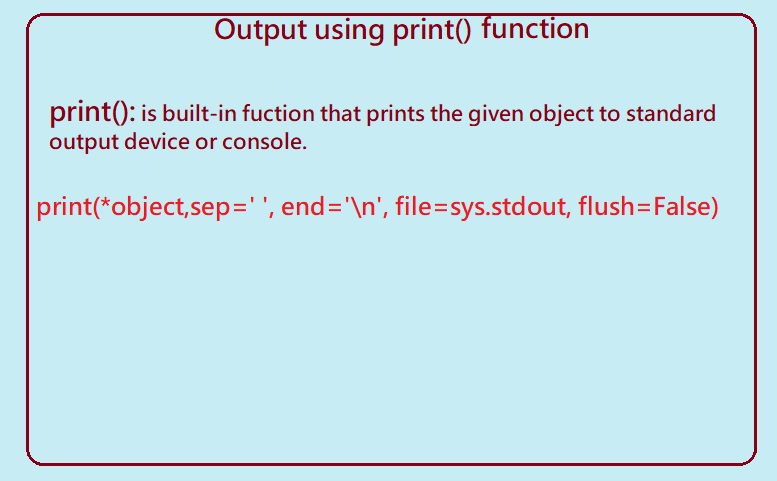
print(*objects, sep=' ', end='\n', file=sys.stdout, flush=False)

# Simple Usage
print("Hello, World!")
📖 Breaking it down: The print() function accepts multiple arguments. *objects means you can pass any number of items to print. sep controls what goes between items (space by default). end controls what goes at the end (newline by default). file lets you print to a file instead of the screen, and flush forces the output to be written immediately.
1. Basic print() Usage
At its simplest, print() displays text. You can pass strings, numbers, variables — even expressions — and Python will display them all.
# Basic print() Examples
print("Hello, World!")
print(42)
print(3.14159)
print(10 + 5)

# Multiple arguments
print("The answer is", 42)

# Output:
# Hello, World!
# 42
# 3.14159
# 15
# The answer is 42
💡 Important: When you pass multiple arguments, print() automatically adds a space between them. This is the default behavior, but you can change it using the sep parameter.
2. The sep Parameter
By default, print() places a space between multiple items. But what if you want something else? A comma, a dash, or even nothing at all? That's where the sep parameter comes in.
The sep parameter lets you define exactly what goes between your items. It's a small change that can make a big difference in how your output looks.
# The sep Parameter
print(10, 11, 12)                 # Default: space between
print(10, 11, 12, sep='*')        # Asterisk between
print(10, 11, 12, sep='-')        # Dash between
print(10, 11, 12, sep='')         # No separator

# Output:
# 10 11 12
# 10*11*12
# 10-11-12
# 101112
💡 Real-world use: sep is perfect for formatting output like CSV files, log entries, or any situation where you need a specific separator between values.
3. The end Parameter
When you use print(), it automatically adds a newline at the end. That's why each print() appears on its own line. But sometimes you want something different — maybe a space, a comma, or nothing at all.
The end parameter controls what gets printed at the end of your output. By default, it's \n (newline), but you can change it to anything you want.
# The end Parameter
print(11, 12, sep='#', end='%')
print(13, 14, sep='#')

# Output:
# 11#12%13#14

# Printing without newline
print("Hello", end=" ")
print("World!")

# Output:
# Hello World!
💡 Why this matters: The end parameter is essential for creating progress bars, building strings incrementally, or any situation where you want to control how your output lines are structured.
4. The file Parameter
Normally, print() sends output to the screen. But what if you want to send it to a file instead? The file parameter lets you redirect output to any object that has a write() method.
# The file Parameter
import sys

# Print to screen (default)
print("Hello, World!")

# Print to standard error
print("Error: Something went wrong!", file=sys.stderr)

# Print to a file
with open("output.txt", "w") as f:
    print("This goes to the file", file=f)
💡 Real-world use: The file parameter is used for logging, writing reports, and any situation where you need to save output rather than just display it.
5. Output Formatting
Sometimes, basic output isn't enough. You want your output to look professional — clean columns, aligned numbers, consistent formatting. Python offers several ways to achieve this.
Output formatting is about making your program's output more readable and visually appealing. It's the difference between a raw data dump and a polished report.
5.1 String Modulo Operator (%)
The string modulo operator % is one of the oldest ways to format strings in Python. It's still widely used and supported.
# String Modulo Operator (%)
print("Empno: %2d, Avg Rating: %5.2f" % (1, 6.433))
print("Total Employees: %3d, Managers: %2d" % (2400, 100))
print("%7.3o" % (25))    # Octal
print("%10.3E" % (356.08977))  # Exponential

# Output:
# Empno:  1, Avg Rating:  6.43
# Total Employees: 2400, Managers: 100
#     031
# 3.561E+02
5.2 The format() Method
The format() method is a more powerful and flexible way to format strings. It uses curly braces {} as placeholders and lets you control exactly how values are inserted.
# format() Method
print('I love {} for "{}!"'.format('Python', 'Programming'))

# Positional arguments
print('{0} and {1}'.format('Python', 'Programming'))
print('{1} and {0}'.format('Python', 'Programming'))

# Keyword arguments
print('Hey! Welcome to {code}. Learn about {language}'.format(
    code='Coding', language='Python'
))

# Output:
# I love Python for "Programming!"
# Python and Programming
# Programming and Python
# Hey! Welcome to Coding. Learn about Python
# format() with variables
x = 30
y = 21
mul = x * y

print('The value of x is {} and y is {}'.format(x, y))
print('{2} is the multiplication of {0} and {1}'.format(x, y, mul))

# Output:
# The value of x is 30 and y is 21
# 630 is the multiplication of 30 and 21
5.3 f-strings (Formatted Strings)
f-strings, introduced in Python 3.6, are the most modern and recommended way to format strings. They're concise, readable, and fast.
# f-strings (Formatted Strings)
name = "Python"
version = 3.12
year = 2024

print(f"Language: {name}, Version: {version}, Year: {year}")

# With expressions
radius = 5
print(f"Area of circle: {3.14 * radius * radius:.2f}")

# With variables
x = 30
y = 21
mul = x * y
print(f"The product of {x} and {y} is {mul}")

# Output:
# Language: Python, Version: 3.12, Year: 2024
# Area of circle: 78.50
# The product of 30 and 21 is 630
💡 Why f-strings are best: They're the most readable, the most efficient, and the most modern way to format strings. If you're using Python 3.6 or later, f-strings should be your first choice for string formatting.
6. Best Practices for print()
✅ Use f-strings for Clean Formatting
f-strings are the most readable and efficient way to format strings. They let you embed expressions directly in your strings, making your code cleaner and easier to understand.
# GOOD: f-strings
name = "Alice"
score = 95
print(f"Student: {name}, Score: {score}")

# BAD: Manual concatenation
print("Student: " + name + ", Score: " + str(score))
✅ Use sep and end for Clean Layout
The sep and end parameters give you fine control over output formatting. Use them to create clean, professional-looking output.
# Print items as CSV
print("Name", "Age", "City", sep=",")

# Print progress without newline
for i in range(5):
    print(i, end=" ")
print()  # Final newline
Try It Yourself!
Experiment with the print() function directly in your browser. Modify the code and see the results in real time.
PRINT() FUNCTION
========================================
1. BASIC PRINT
Hello, World!
42
3.14159
2. MULTIPLE ARGUMENTS
The answer is 42
3. SEP PARAMETER
10 11 12
10*11*12
101112
4. END PARAMETER
11#12%13#14
5. F-STRINGS
Language: Python, Version: 3.12
6. NUMBER FORMATTING
Pi rounded: 3.14
✅ Explore different print() features!
🎉 You've Mastered Python print()!
You understand the print() function, its parameters, and how to format output professionally. These are essential skills for interactive Python programs!
Quick Quiz – Test Your Knowledge
print()?end parameter do in print()?Frequently Asked Questions
🤔 What's the difference between print() and return?
print() displays output to the console. return sends a value back from a function. print() is for user communication; return is for function communication.
🔧 How do I prevent print() from adding a new line?
end parameter: print("Hello", end="") or print("Hello", end=" ") to add a space instead of a newline.
📐 Can I print multiple lines with one print()?
\n for newlines: print("Line 1\nLine 2\nLine 3"). You can also use triple quotes for multi-line strings.
📊 What's the difference between sep and end?
sep controls what goes between the items you print. end controls what goes at the very end of the output. They serve different purposes and can be used together.
⚡ How do I print to a file instead of the console?
file parameter: print("Hello", file=open("output.txt", "w")). Or better, use a with statement to ensure the file is properly closed.
🎯 What is the flush parameter used for?
flush parameter forces the output to be written immediately. This is useful in real-time applications like progress bars, log monitoring, and interactive programs where you want to see output immediately.
📚 Where to Go From Here
Now that you've mastered the print() function, here are some related topics that will take your Python skills further:
⌨️ Accepting User Input
You've learned how to speak — now learn how to listen! The input() function lets your programs accept data from users.
📝 I/O Assignments
Practice what you've learned with real-world coding challenges that combine input and output.
Start Practicing →🚀 Simple Python Scripts
Combine input and output to build practical, real-world programs that solve actual problems.
Build Scripts →