Python

P
PythonHub
Progress 0%

Python

  • Home
  • History of Python
  • Applications of Python
  • Introduction To Python
    • What is Python
    • Character Set
    • Tokens in Python
    • Python Execution Mode
    • Variable And Identifiers
    • Data Types in Python
    • Operators And Expressions
    • Constants in Python
    • Assignment Statement
    • Input / Output in Python
    • Simple Python Scripts
    • Namespace in Python
    • 📝 Assignments
  • Operators in Python
    • Arithmetic Operators
    • Assignment Operators
    • Shorthand Assignment Operators
    • Relational Operators
    • Logical Operators
    • Bitwise Operators
    • Special Operators
    • 📝 Assignments
  • Input Output in Python
    • Accept Input
    • Output Formatting
    • 📝 Assignments
  • Conditional Statement
    • Decision Making
    • if Statement
    • IF-ELSE STATEMENT
    • IF-ELSE LADDER
    • NESTED IF-ELSE
    • Short Hand IF-ELSE
    • 📝 Assignments
  • Loops
    • Introduction to Loops
    • While Loop
    • Nested While Loop
    • 📝 While Loop Assignments
    • For Loop
    • For Loop Examples
    • Nested For Loop
    • Nested For Loop Examples
    • Infinite While Loops
    • Infinite For Loops
    • Break, Continue and Else in Loops
    • Difference Between For and While Loop
    • For Each Loop
    • 📝 For Each Assignments
    • 📝 All Loops Assignments
  • List
    • List in Python
    • Access List Elements
    • List Functions
    • Iterate (Loop) List
    • List Comprehension
    • 📝 Assignments
  • Tuple
    • Tuple in Python
    • Access Tuple Elements
    • Tuple Functions
    • Iterate (Loop) Tuple
    • Unpack Tuple
    • Tuple Comprehension
    • 📝 Assignments
  • Set
    • Set in Python
    • Access Set Elements
    • Set Methods
    • Iterate (Loop) Set
    • Pack/Unpack Set
    • Set Comprehension
    • 📝 Assignments
  • Dictionary
    • Dictionary
    • Access Dictionary Items
    • Dictionary Methods
    • Iterate (Loop) Dictionary
    • Formatting Dictionaries
    • Nested Dictionaries
    • Dictionary Comprehension
    • 📝 Assignments
  • Diff List Tuple Set Dictionary
    • List vs Tuple
    • List vs Set
    • List vs Dictionary
    • Tuple vs Set
    • Tuple vs Dictionary
    • Dictionary vs Set
    • 📝 Assignments
  • Exception
    • Error vs Exception
    • Exception Handling
    • Types of Exception
    • User Defined Exception
    • Logging Exception
    • 📝 Assignments
  • Functions
    • Introduction to Functions
    • Modular Programming
    • Types of Functions
    • Inbuilt Functions
    • Need For User-Defined Function
    • Elements of User Defined Function
    • Function Arguments
    • Nesting of Functions
    • Recursion
    • Global Local and Non Local
    • Python Lambda Functions
    • 📝 Assignments
  • Python Module
    • Introduction to Module
    • Inbuilt Modules in Python
    • User Defined Module
    • 📝 Assignments
  • File Handling
    • Introduction to Files
    • Create File
    • Read Files
    • Write to File
    • Rename File
    • Copy File
    • Move File
    • List Files in Directory
    • Binary Files
    • Zipping and Unzipping Files
    • 📝 Assignments
  • Strings
    • Basics of Strings
    • String Special Operators
    • String Formatting Operators
    • String Methods
    • 📝 Assignments
  • Regular Expressions
  • Python OOPS
    • Basics of Object Oriented
    • What are Classes and Objects?
    • Creating Class and Object
    • OOP vs Procedural Programming
    • Difference Between Classes and Objects
    • Constructors
    • Destructor
    • Built Class Methods and Attributes
    • Class and Instance Variables
    • Inheritance in Python
    • Single Inheritance
    • Multiple Inheritance
    • Multilevel Inheritance
    • Hierarchical Inheritance
    • Hybrid Inheritance
    • Abstraction
    • Method Overriding
    • Abstract Method
    • Interfaces in Python
    • Abstract Class vs Interface
    • Public, Private and Protected
    • Overloading vs Overriding
    • Inheritance vs Composition
    • Encapsulation
    • Polymorphism
    • Inner Classes
    • 📝 Assignments
  • Advanced Python
    • Iterator in Python
    • Generator in Python
    • Decorator in Python
    • Type Hints in Python
    • Async/Await Programming
    • Dataclasses in Python
    • Context Managers in Python
    • Property Decorator in Python
    • __slots__ in Python
    • Enums in Python
    • Walrus Operator in Python
    • Match-Case in Python
    • 📝 Assignments
  • Python Standard Library
    • Collections Module
    • Itertools Module
    • Functools Module
    • Datetime Module
    • JSON Module
    • OS Module
    • Sys Module
    • Random Module
    • Math Module
    • 📝 Assignments
  • Python Testing
    • Unit Testing in Python
    • Pytest Framework
    • Mocking in Python
    • 📝 Assignments
  • Python Best Practices
    • PEP 8 Style Guide
    • Docstrings in Python
    • Logging in Python
    • Code Optimization Tips
    • Debugging Techniques
    • 📝 Assignments
  • MySQL Database in Python
    • Introduction to MySQL with Python
    • DBMS vs File System
    • Connecting to MySQL Database
    • Create Database in MySQL
    • Create Table in MySQL
    • Insert Data in MySQL
    • Insert Multiple Rows
    • Select Data from MySQL
    • WHERE Clause in MySQL
    • Update Data in MySQL
    • Delete Data from MySQL
    • Parameterized Queries
    • Transaction Management
    • Error Handling
    • Connection Pooling
    • MySQL Drivers Guide
    • Joins in MySQL
    • Aggregation Functions
    • Backup MySQL Database
    • Best Practices
    • 📝 Assignments
  • MySQL Database Operations
    • SELECT Statement
    • MySQL Operators
    • DDL Statements
    • DML Statements
    • Subqueries
    • JOIN Operations
    • Aggregation
    • Case Study
    • 📝 Assignments
  • Graphics in Python
  • Threads in Python
    • Introduction to Threads
    • Process vs Threads
    • Concurrent Programming & GIL
    • Uses of Threads
    • Creating Threads
    • Single Tasking
    • Multi Tasking
    • Thread Synchronization
    • 📝 Assignments
  • Interview Questions & Answers
  • Python Case Studies
  • Multiple Choice Questions
  • 📝 Practice Problems
Get in Touch
  • tech2dsm@gmail.com

© Sankalan Data Tech

Python Language Interactive Tutorial

🐍 Python Execution Modes: Interactive vs Script Mode

Python Execution Modes - Interactive and Script Mode

Understanding Python execution modes — interactive mode (REPL) and script mode

Created by Sankalan Data Tech Team Verified
Data Engineers, Analysts, Scientists & Trainers
We are a team of Python developers, data engineers and data scientists with years of real-world experience. We have built production applications. We have tackled complex problems. We have helped teams ship better code. What drives us? Teaching — especially that moment when things finally click. Our tutorials focus on practical examples and honest guidance. Whether you are just starting out or leveling up we are here to make Python genuinely useful.
📑 On this page:
  • What is Execution Mode?
  • Interactive Mode (REPL)
  • Script Mode
  • Interactive vs Script Mode
  • Try It Yourself
  • Test Your Knowledge
  • FAQ
  • Learning Resources
Share this tutorial:
Twitter LinkedIn Facebook WhatsApp Reddit Telegram Email Copy Link
📚 What You'll Learn Here
  • What is Execution Mode — Understanding how Python runs your code
  • Interactive Mode (REPL) — Running Python commands one by one
  • Script Mode — Writing and executing complete Python programs
  • REPL Explained — Read-Eval-Print-Loop in detail
  • Advantages & Disadvantages — When to use each mode
  • Hands-on Practice — Write and run Python code in your browser
  • Test Your Knowledge — Interactive quiz

What is Execution Mode?

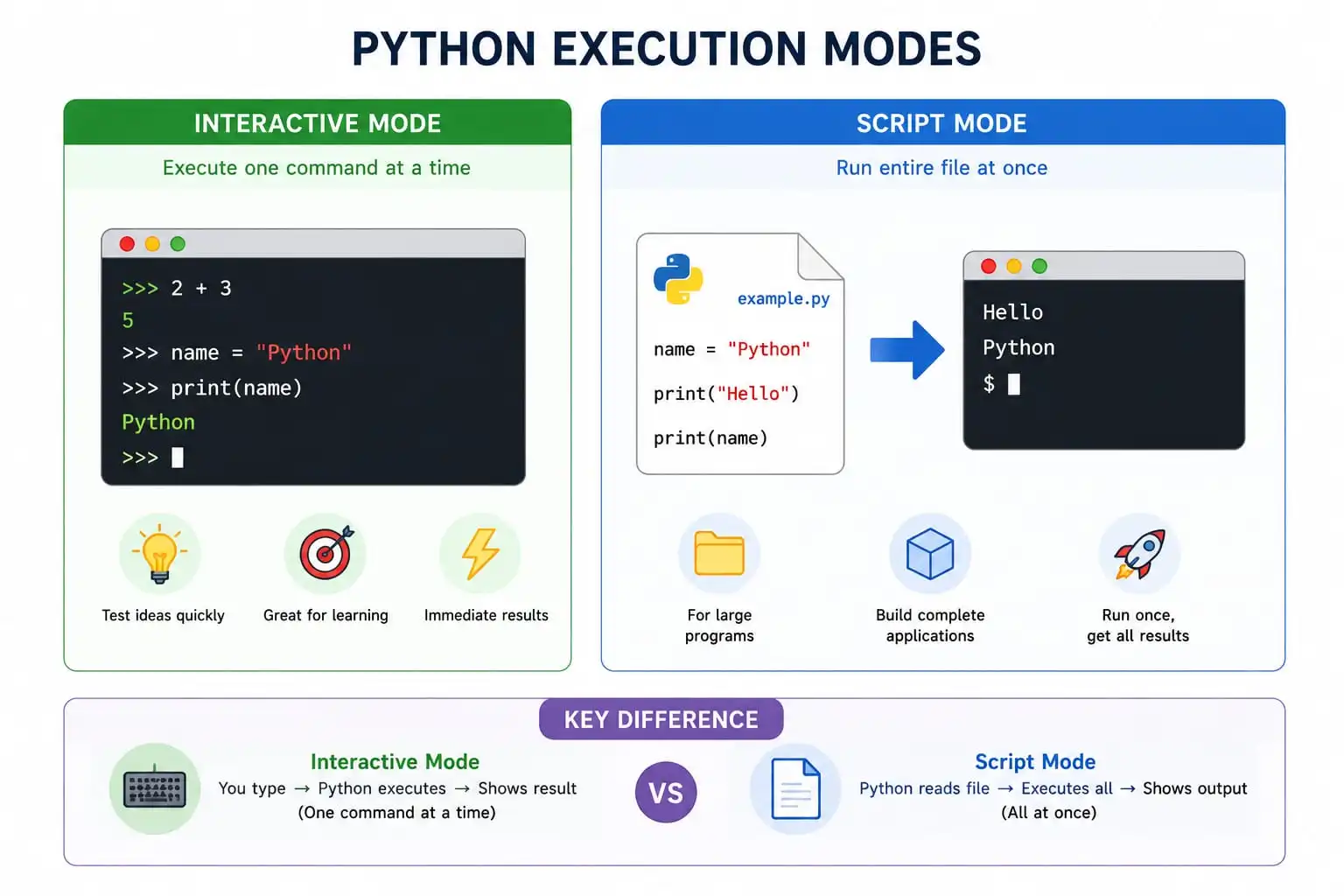
Execution Mode refers to the way or the method of processing a Python script. It determines how Python reads and executes your code.

Python offers two ways to run your code:

  • 1. Interactive Mode (REPL) — Run Python commands one at a time
  • 2. Script Mode — Write and run complete programs stored in files

💡 Quick tip: Beginners often start with interactive mode to experiment, then move to script mode for building real applications. Both are essential skills!

1. Interactive Mode (REPL)

Interactive Mode is the way of running single lines or blocks of Python code. It's also known as REPL.

REPL stands for Read-Eval-Print-Loop:

  • Read: Accepts input from the user and stores it in memory
  • Eval: Evaluates the input from memory
  • Print: Prints the output from the eval function
  • Loop: Creates a loop that terminates when the program ends

Interactive mode provides a simple and quick way to run Python code. You type a command, press Enter, and get immediate results. It's perfect for testing ideas, learning Python basics, and experimenting with small code snippets.

Microsoft Windows [Version 10.0.19045.2604]
(c) Microsoft Corporation. All rights reserved.

C:\Users\HP>python
Python 3.11.2 (tags/v3.11.2:878ead1, Feb  7 2023, 16:38:35) [MSC v.1934 64 bit (AMD64)] on win32
Type "help", "copyright", "credits" or "license" for more information.

>>>

Examples in Interactive Mode:

Using the print() function:
>>> print("I am print() and prints something i.e message in interpreted mode.")
I am print() and prints something i.e message in interpreted mode.

Performing mathematical operations:
>>> 1+1
2
>>> 5*5
25
>>> 600-34
566
>>> 56/5
11.2
>>> 56//5
11

Storing values and performing operations:
>>> p="Python"
>>> p*3
'PythonPythonPython'
>>> y="Language"
>>> print("I am not " +p+ " but I am a " +y)
I am not Python but I am a Language

Getting Help in Interactive Mode:

>>> help()

Welcome to Python 3.11's help utility!

If this is your first time using Python, you should definitely check out
the tutorial on the internet at https://docs.python.org/3.11/tutorial/.

Enter the name of any module, keyword, or topic to get help on writing
Python programs and using Python modules.  To quit this help utility and
return to the interpreter, just type "quit".

help> print
Help on built-in function print in module builtins:

print(*args, sep=' ', end='\n', file=None, flush=False)
    ...
    (Type q to exit from help)

✅ Advantages of Interactive Mode

  • Helpful when your script is extremely short
  • Faster — immediate results
  • Good for beginners to understand Python basics
  • No need to create and save a file

❌ Disadvantages of Interactive Mode

  • Hard to edit code — must rewrite previous commands
  • Very tedious to run long pieces of code
  • No persistence — code is lost after closing
  • Not suitable for production applications

2. Script Mode

Script Mode is the execution mode used when you're working with a block of code or more than one line of code. It's used when you want to execute one or more lines of code in one go.

When you want to write a long piece of code, interactive mode is not recommended. Instead, you save your code in a Python file with the .py extension — this file is called a script.

Popular text editors for writing Python scripts include Sublime, Atom, Notepad++, and the built-in IDLE editor. Upon execution, all commands run together.

How to Write and Execute a Python Script:

  • From Python IDLE shell, go to File Menu → New File (or Ctrl+N)
  • Write your Python script:
print("Welcome to Python")
print("Developed by Guido van Rossum")
  • Save the script with a .py extension, e.g., welcome.py
  • Execute the script by going to Run Menu → Run Module (or press F5)
Output:
Welcome to Python
Developed by Guido van Rossum

Running Python Scripts from the Command Line:

On Windows:
C:\users\python> python welcome.py
# OR
C:\users\python> welcome.py

Welcome to Python
Developed by Guido van Rossum

On Linux/Unix:
$ chmod +x welcome.py    # Assign execution permissions
$ ./welcome.py           # Run the script

Welcome to Python
Developed by Guido van Rossum

✅ Advantages of Script Mode

  • Simple and easy to run large pieces of code
  • Editing and modification is easier
  • Good for both beginners and experts
  • Code can be saved, reused, and shared
  • Suitable for production applications

❌ Disadvantages of Script Mode

  • Tedious for running just a few lines of code
  • Must create and save a file before execution
  • Need to set up the environment properly

Interactive Mode vs Script Mode

Feature 🔄 Interactive Mode 📄 Script Mode
Execution Line by line All at once
File Needed No Yes (.py file)
Editing Difficult Easy
Best For Testing, learning, small code Programs, applications, large code
Code Persistence Lost after closing Saved permanently
Beginner Friendly ✅ Very friendly ✅ Friendly

Try It Yourself!

Now it's your turn! Write and run Python code directly in your browser:

Loading Pyodide... 0%
Python Code Editor
========================================
Welcome to Python Script Mode!
========================================
Hello, Python Learner!
10 + 3 = 13
10 - 3 = 7
10 * 3 = 30
10 / 3 = 3.3333333333333335
10 // 3 = 3
10 % 3 = 1
PYTHON IS AWESOME!
python is awesome!
I love apple!
I love banana!
I love cherry!
========================================
Script execution complete! 🎉
========================================

🎯 Challenge Yourself!
• Add a new variable with your favorite number and print it
• Create a list of your favorite colors and loop through them
• Try using the multiplication operator with two numbers

🏆

🎉 You've Mastered Python Execution Modes!

You now understand how Python runs your code — in interactive mode and script mode. You've learned when to use each mode and have even run your own Python scripts!

Quick Quiz - Test Your Knowledge

Let's see what you've learned about Python execution modes:

1. What does REPL stand for in Python?
2. Which mode is best for writing long pieces of code?
3. What file extension is used for Python scripts?

Frequently Asked Questions

🤔 What is the difference between interactive mode and script mode? ▼

Interactive mode executes Python commands one at a time, giving immediate results. It's great for testing and learning. Script mode runs entire Python files (.py) all at once. It's used for building complete programs and applications. Think of interactive mode as trying out ideas, and script mode as building the final product.

💻 How do I start interactive mode in Python? ▼

Simply open your terminal (or command prompt) and type python (or python3 on Linux/Mac) and press Enter. You'll see the >>> prompt, which means you're in interactive mode. Type your Python commands and see results immediately!

📁 Why do I need to save Python scripts with a .py extension? ▼

The .py extension tells your computer that the file contains Python code. This helps your operating system know which program to use to open it. It also helps text editors apply syntax highlighting, making your code easier to read. Plus, it's the standard convention that all Python developers follow!

🎯 Can I run a Python script from interactive mode? ▼

Yes! You can run a Python script from interactive mode using the exec() function or by importing the script as a module. However, it's usually easier to just run the script directly from the command line using python script_name.py.

📚 Where to Go From Here

Now that you understand Python execution modes, here are some related topics to explore:

🔣 Python Tokens

Learn about keywords, identifiers, and operators

📝 Variables & Identifiers

Learn how to name and use variables

📊 Data Types

Explore Python's built-in data types

📖 Related Tutorials
  • What is Python
  • Tokens in Python
  • Character Set in Python
  • Applications of Python
Previous: Python Tokens Next: Variable and Identifiers →