- What is an Application - Understanding the basics of software applications
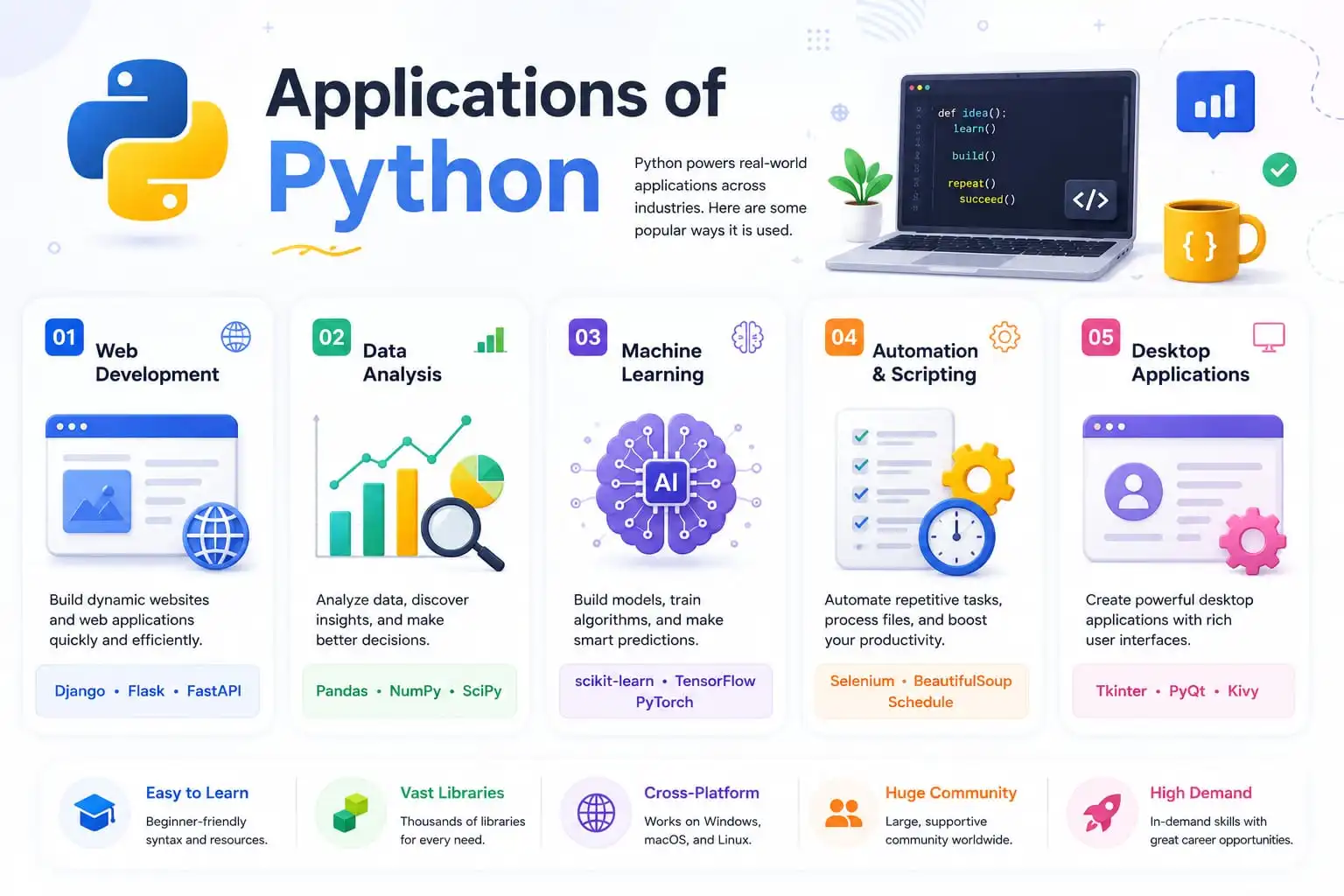
- Web Development - Building websites with Python frameworks like Django and Flask
- Game Development - Creating games with Python libraries like PyGame and Panda3D
- AI & Machine Learning - Python's role in artificial intelligence with TensorFlow and PyTorch
- Data Science - Data analysis and visualization with Pandas, NumPy, and Matplotlib
- Desktop Applications - Building GUI apps with Tkinter, PyQt, and Kivy
- Network Programming - Python's capabilities for networking and protocols
- Database Access - Working with SQLite, MySQL, PostgreSQL, and Oracle
- And 8+ more applications - Explore all Python applications in detail
What is an Application?
Before we dive into what Python can do, let's take a step back and understand what we mean by the word "application." You hear it all the time — "I downloaded a new app," "This application crashed," "My productivity apps." But what does it actually mean?
Simply put, an application — or "app" as we often call it — is software designed to help you do something specific. It's like a tool in a workshop: you wouldn't use a hammer to cut wood, and you wouldn't use a word processor to edit photos. Each application is built for a particular task or set of tasks.
When you open an application on your phone, laptop, or tablet, it runs inside your operating system (Windows, macOS, Linux, Android, iOS) until you close it. And if you're like most people, you probably have multiple applications running at the same time — that's called multi-tasking, and it's something we all do without thinking twice.
Here's a fun thought: the word "app" used to sound fancy and technical. Now, even my grandmother asks me to "download the app" for her favorite grocery store. That's how much our world has changed — and Python is at the heart of much of that change.
💡 Did you know? The term "app" became mainstream with the rise of smartphones. But applications have been around since the early days of computing — they just used to come on floppy disks or CDs!
Why Python for Applications?
So why has Python become the go-to language for so many types of applications? Let me give you three solid reasons why Python is the perfect choice for building applications:
🚀 Rapid Development
Python's clean syntax and "batteries included" philosophy mean you can build applications 2-5x faster than with languages like Java or C++. Less code means fewer bugs and faster time to market.
🌍 Cross-Platform Compatibility
Write once, run anywhere! Python applications work seamlessly on Windows, macOS, Linux, and even mobile platforms. No need to rewrite code for different operating systems.
📦 Massive Ecosystem
With over 500,000+ packages on PyPI, Python has a library for almost everything. Need to build a web app? Use Django. Machine learning? TensorFlow. Game? PyGame. It's all there!
The Evolution of Python Applications
Python wasn't always the application-building powerhouse it is today. Let's take a quick journey through Python's evolution in the world of applications.
When Guido van Rossum created Python in 1991, it was primarily used for system administration and scripting. But as the language grew, developers started building more complex applications with it.
The real turning point came in the early 2000s when frameworks like Django (2005) and Flask (2010) made web development incredibly easy. Around the same time, scientific libraries like NumPy and SciPy (2006) made Python the language of choice for data science and research.
Today, Python powers everything from Instagram's backend to Netflix's recommendation engine. It's the language that runs NASA's space missions, Tesla's self-driving cars, and Wall Street's algorithmic trading systems.
📅 Python Applications Through Time
Python created, used for scripting
Scientific computing libraries emerge
Django framework revolutionizes web apps
Flask makes web apps even simpler
Python powers AI, ML, and enterprise apps
📈 Fun fact: Python is now used in over 85% of all data science and machine learning applications worldwide. It's the undisputed king of AI application development!
How to Get Started with Python Applications
Ready to start building Python applications? Here's how to get started, depending on what you want to build:
🌐 Web Applications
- Install Django or Flask:
pip install django - Create your first project:
django-admin startproject myapp - Run the development server:
python manage.py runserver - Visit
http://127.0.0.1:8000to see your app!
📊 Data Science Apps
- Install Jupyter Notebook:
pip install jupyter - Install Pandas & NumPy:
pip install pandas numpy - Launch Jupyter:
jupyter notebook - Start analyzing data immediately!
🖥️ Desktop Applications
- Install Tkinter (built-in) or PyQt:
pip install pyqt5 - Create your first window in Python
- Add buttons, text, and functionality
- Package your app with
pyinstaller
Key Features for Python Application Development
What makes Python so powerful for application development? Here are the features that developers love:
1. Huge Standard Library
Python comes with "batteries included" — everything from file handling to networking is built-in. You can build entire applications without third-party libraries.
2. Framework Ecosystem
From Django to Flask, FastAPI to PyQt, Python has frameworks for every type of application. Choose the right tool for your project.
3. Cross-Platform Support
Build once, deploy everywhere. Python applications run on Windows, macOS, Linux, and even mobile platforms like Android and iOS.
4. Easy Integration
Python integrates seamlessly with C, C++, Java, and other languages. Need performance-critical code? Write it in C and call it from Python.
5. Rapid Prototyping
Build a working prototype in days, not weeks. Python's simplicity lets you test ideas quickly and iterate based on feedback.
6. Great for Teams
Python's clean syntax makes it easy for teams to collaborate. New developers can understand existing code quickly.
7. Excellent Documentation
Python has one of the best documentation systems in the programming world. Every library is well-documented with examples.
8. Active Community
With over 10 million developers worldwide, you'll never be stuck. The community is friendly, helpful, and always growing.
Python vs Other Languages for Application Development
Wondering how Python stacks up against other popular languages for building applications? Here's an honest comparison:
Common Mistakes When Building Python Applications
Even experienced developers make mistakes. Here are the most common pitfalls when building Python applications and how to avoid them:
❌ Not Using Virtual Environments
Installing packages globally leads to dependency conflicts between projects. One project needs Django 3.0, another needs Django 4.0 — chaos!
✅ The Fix: Always use venv or conda to create isolated environments for each project. python -m venv myenv
❌ Ignoring Error Handling
Applications crash when unexpected input is received. Users get frustrated and abandon your app.
✅ The Fix: Use try/except blocks to handle errors gracefully. Always provide meaningful error messages to users.
❌ Hardcoding Sensitive Information
Storing API keys, database passwords, and secret keys directly in your code is a security nightmare.
✅ The Fix: Use environment variables with the os.environ module or a .env file with python-dotenv.
❌ Not Optimizing Database Queries
Making hundreds of database calls for a single page load makes your app slow and unresponsive.
✅ The Fix: Use Django's select_related() and prefetch_related(). Use SQLAlchemy's eager loading. Always profile your queries!
Real-World Applications Built with Python
Python isn't just for learning — it's for building real applications that people use every day. Here are some of the most impressive Python applications:
- 📊 Data Science & Analytics: Companies use Python to analyze millions of data points, discover patterns, and make better business decisions. Tools like pandas and NumPy are used by data scientists everywhere.
- 🤖 Artificial Intelligence & Machine Learning: Ever wondered how Netflix recommends shows or how self-driving cars work? That's AI and machine learning, and Python is the language behind it all.
- 🌐 Web Development: Instagram uses Python. Spotify uses Python. Pinterest uses Python. With frameworks like Django and Flask, you can build powerful web applications quickly.
- 🔬 Scientific Research: From studying the human genome to exploring distant planets, Python helps scientists analyze complex data. NASA actually uses Python for space exploration!
- ⚙️ Automation: Tired of repetitive tasks? Python can automate almost anything — sending emails, organizing files, downloading data, you name it.
- 🎮 Game Development: While Python isn't the most powerful language for AAA games, it's great for 2D games and game prototypes. Pygame is a popular library for beginners.
- 🏦 Financial Technology: Hedge funds and banks use Python for algorithmic trading, risk analysis, and financial modeling.
- 🖥️ Desktop Applications: Need a cross-platform app? Python's tkinter, PyQt, and Kivy let you build applications that work on Windows, Mac, and Linux.
🐍 Quick Reference - Building Python Applications
Bookmark this page! Here are the most common Python patterns and libraries for building applications:
🌐 Web Development
# Django - Full-featured framework
from django.http import HttpResponse
def home(request):
    return HttpResponse("Hello World!")

# Flask - Microframework
from flask import Flask
app = Flask(__name__)
@app.route('/')
def home():
    return "Hello World!"
📊 Data Science
import pandas as pd
import numpy as np
import matplotlib.pyplot as plt

# Load and analyze data
df = pd.read_csv('data.csv')
print(df.describe())
df.plot(kind='bar')
plt.show()
🤖 Machine Learning
from sklearn.ensemble import RandomForestClassifier
from sklearn.model_selection import train_test_split

X_train, X_test, y_train, y_test = train_test_split(X, y)
model = RandomForestClassifier()
model.fit(X_train, y_train)
predictions = model.predict(X_test)
🖥️ Desktop GUI (Tkinter)
import tkinter as tk

root = tk.Tk()
label = tk.Label(root, text="Hello World!")
label.pack()
button = tk.Button(root, text="Click Me")
button.pack()
root.mainloop()
🗄️ Database Access
import sqlite3

conn = sqlite3.connect('mydb.db')
cursor = conn.cursor()
cursor.execute("SELECT * FROM users")
rows = cursor.fetchall()
conn.close()
📦 Package Management
# Create virtual environment
python -m venv myenv

# Activate (Windows)
myenv\Scripts\activate

# Activate (Mac/Linux)
source myenv/bin/activate

# Install packages
pip install django pandas numpy flask
Let's Build a Simple Application!
Enough theory — let's actually build something! This is my favorite part. You can write and run Python code directly in your browser using Pyodide. Try building a simple application right now!
Hello Sankalan!
Access Granted
Sum = 30
Thank you! 🐍
🎯 Challenge Yourself!
• Add a multiplication table generator
• Create a to-do list application
• Build a temperature converter (Celsius ↔ Fahrenheit)
⚡ Pro tip: Hit Ctrl+Enter to run your code faster. This is how real Python developers work!
🎉 You're Building Python Applications!
You've learned about Python's powerful application development capabilities. You understand what applications are, how Python powers them, and you've even written your own interactive application. That's a huge achievement!
Quick Quiz - Test Your Knowledge
Let's see how much you've learned about Python applications! Answer these 3 questions:
Frequently Asked Questions
🤔 What types of applications can I build with Python? ▼
💼 How do I get a job building Python applications? ▼
🎯 What's the best first Python application to build? ▼
- To-Do List App - Start with a command-line version, then add a GUI
- Weather App - Use an API to fetch and display weather data
- Calculator - Build a simple calculator, then add scientific functions
- Blog - Use Flask or Django to build a simple blog
- Data Dashboard - Analyze a dataset and create visualizations
📚 What should I learn after building my first application? ▼
- Step 1: Master Python fundamentals (variables, loops, functions)
- Step 2: Learn about data structures (lists, dictionaries, sets)
- Step 3: Explore object-oriented programming (OOP)
- Step 4: Build a web application with Django or Flask
- Step 5: Learn about databases and SQL
- Step 6: Explore data science with Pandas and NumPy
- Step 7: Deploy your applications to the cloud
📚 Where to Go From Here
Congratulations on making it this far! You now understand the incredible range of applications you can build with Python. Here are some excellent resources to continue your journey:
🐍 Official Python Site
Documentation, downloads, and tutorials
📦 Python Package Index
500,000+ Python packages to explore
💬 Stack Overflow
Ask questions, get answers from the community