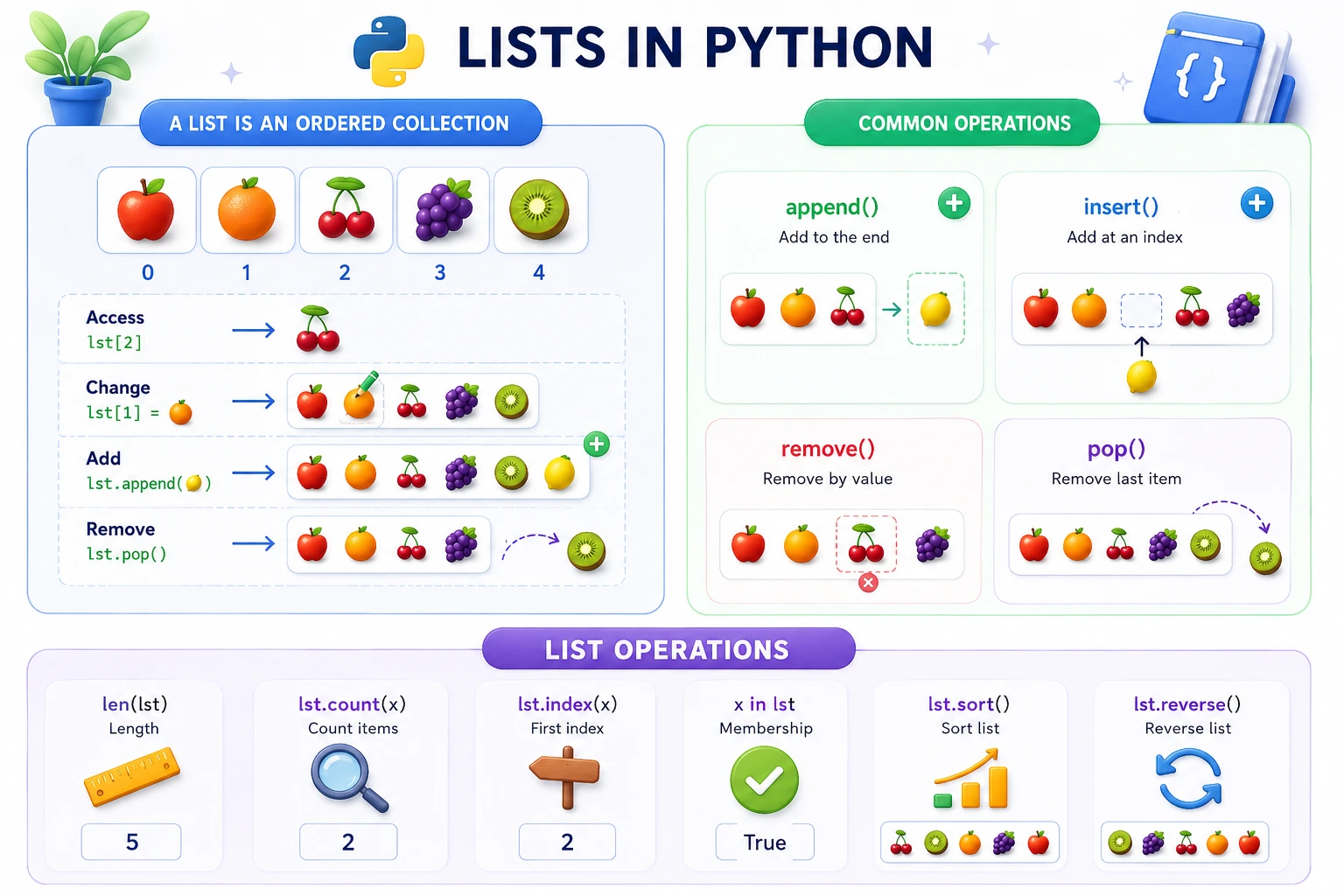
- What a Python list is — the most versatile data structure
- How to create lists — using square brackets and list()
- Indexing and slicing — accessing elements
- Modifying lists — adding, removing, and updating elements
- List operations — concatenation, repetition, and membership
- Common mistakes — and how to avoid them
Welcome: What is a Python List?
Think of it this way: A list is like a shopping cart. You can add items, remove items, change items, check if an item is in the cart, and see how many items you have. You can put any type of item in your cart — fruits, vegetables, electronics, or even other carts!
A list in Python is a collection of items that is ordered, mutable (changeable), and allows duplicate values. It's one of the most versatile and commonly used data structures in Python.
💡 Key insight: Lists can contain any type of data — numbers, strings, booleans, even other lists. This flexibility makes them incredibly powerful.
Characteristics of Python Lists:
- Ordered: Items have a defined order that will not change
- Mutable: You can add, remove, or change items after creation
- Indexed: Each item has a position (starting from 0)
- Allow duplicates: You can have the same value multiple times
- Mixed types: Can contain different data types
Creating Lists
How to Create Lists
There are several ways to create a list in Python:
# Method 1: Using square brackets (most common)
fruits = ["apple", "banana", "cherry"]
numbers = [1, 2, 3, 4, 5]
mixed = [1, "hello", 3.14, True]

# Method 2: Using list() constructor
fruits2 = list(("apple", "banana", "cherry"))

# Method 3: Empty list
empty = []
empty2 = list()

# Method 4: List with range()
nums = list(range(1, 6))  # [1, 2, 3, 4, 5]

# Method 5: List comprehension
squares = [x**2 for x in range(1, 6)]  # [1, 4, 9, 16, 25]

print("Fruits:", fruits)
print("Numbers:", numbers)
print("Mixed:", mixed)
print("Squares:", squares)
Key points:
- Use square brackets [] for the most common way
- Lists can contain any data type
- Use list() to convert other sequences to lists
- An empty list is useful for building lists later
✅ Quick Check: What's the most common way to create a list in Python? (Answer: Using square brackets [])
Indexing Lists
Accessing Elements by Position
Each element in a list has a position called its index. Python uses 0-based indexing:
fruits = ["apple", "banana", "cherry", "mango", "orange"]

# Positive indexing (from the beginning)
print(fruits[0])   # apple
print(fruits[2])   # cherry
print(fruits[4])   # orange

# Negative indexing (from the end)
print(fruits[-1])  # orange
print(fruits[-3])  # cherry
print(fruits[-5])  # apple

# Visual representation:
# Index:   0         1         2         3         4
#       ["apple", "banana", "cherry", "mango", "orange"]
# Index:   -5        -4        -3        -2        -1
Understanding indexing:
- Positive indices start from 0 (first element)
- Negative indices start from -1 (last element)
- Index out of range causes
IndexError
✅ Quick Check: What index does the first element in a list have? (Answer: 0)
Slicing Lists
Extracting Sublists
Slicing allows you to extract a portion of a list:
fruits = ["apple", "banana", "cherry", "mango", "orange", "grape", "kiwi"]

# Slicing syntax: list[start:stop:step]

# Get elements from index 1 to 3 (stop is exclusive)
print(fruits[1:4])    # ["banana", "cherry", "mango"]

# Get elements from start to index 3
print(fruits[:4])     # ["apple", "banana", "cherry", "mango"]

# Get elements from index 2 to end
print(fruits[2:])     # ["cherry", "mango", "orange", "grape", "kiwi"]

# Get elements with step
print(fruits[0:6:2])  # ["apple", "cherry", "orange"]

# Reverse a list
print(fruits[::-1])   # ["kiwi", "grape", "orange", "mango", "cherry", "banana", "apple"]

# Get last 3 elements
print(fruits[-3:])    # ["orange", "grape", "kiwi"]

# Get all except last 2
print(fruits[:-2])    # ["apple", "banana", "cherry", "mango", "orange"]
Slicing rules:
- start is inclusive, stop is exclusive
- Omitted start defaults to 0
- Omitted stop defaults to length of list
- step controls how many items to skip
- Slicing creates a new list (copy)
✅ Quick Check: What does list[::-1] do? (Answer: It reverses the list)
Modifying Lists
Changing Lists
Lists are mutable, so you can change, add, or remove elements:
fruits = ["apple", "banana", "cherry"]

# Change an element
fruits[1] = "blueberry"
print(fruits)  # ["apple", "blueberry", "cherry"]

# Add elements
fruits.append("mango")        # Add to end
print(fruits)                 # ["apple", "blueberry", "cherry", "mango"]

fruits.insert(1, "orange")    # Insert at position 1
print(fruits)                 # ["apple", "orange", "blueberry", "cherry", "mango"]

# Extend a list (add multiple elements)
fruits.extend(["grape", "kiwi"])
print(fruits)                 # ["apple", "orange", "blueberry", "cherry", "mango", "grape", "kiwi"]

# Remove elements
fruits.remove("blueberry")    # Remove by value
print(fruits)                 # ["apple", "orange", "cherry", "mango", "grape", "kiwi"]

popped = fruits.pop()         # Remove and return last element
print(popped)                 # kiwi
print(fruits)                 # ["apple", "orange", "cherry", "mango", "grape"]

fruits.pop(1)                 # Remove element at index 1
print(fruits)                 # ["apple", "cherry", "mango", "grape"]

# Clear the list
fruits.clear()
print(fruits)                 # []
Common modification methods:
- append() — add to the end
- insert() — add at a specific position
- extend() — add multiple elements
- remove() — remove by value
- pop() — remove by index (returns the element)
- clear() — remove all elements
✅ Quick Check: What's the difference between append() and extend()? (Answer: append adds one element, extend adds multiple elements from another list)
List Operations
Working with Lists
Python provides several operations for working with lists:
# Concatenation (+)
list1 = [1, 2, 3]
list2 = [4, 5, 6]
combined = list1 + list2
print(combined)  # [1, 2, 3, 4, 5, 6]

# Repetition (*)
repeated = [1, 2] * 3
print(repeated)  # [1, 2, 1, 2, 1, 2]

# Membership (in)
fruits = ["apple", "banana", "cherry"]
print("banana" in fruits)    # True
print("grape" in fruits)     # False

# Length (len())
print(len(fruits))           # 3

# Finding index
print(fruits.index("banana")) # 1

# Counting occurrences
numbers = [1, 2, 2, 3, 2, 4, 2]
print(numbers.count(2))      # 4

# Sorting
numbers.sort()
print(numbers)               # [1, 2, 2, 2, 2, 3, 4]

# Reversing
numbers.reverse()
print(numbers)               # [4, 3, 2, 2, 2, 2, 1]

# Copying (important!)
original = [1, 2, 3]
shallow_copy = original.copy()
shallow_copy[0] = 99
print(original)              # [1, 2, 3] - unchanged
print(shallow_copy)          # [99, 2, 3]
Key operations:
- + concatenates two lists
- * repeats a list
- in checks membership
- len() returns the length
- copy() creates a shallow copy
✅ Quick Check: What does the in operator check in a list? (Answer: It checks if an element exists in the list)
Common Mistakes to Avoid
Watch Out For These!
❌ Mistake 1: Index Out of Range
Trying to access an element that doesn't exist:
# WRONG
fruits = ["apple", "banana", "cherry"]
print(fruits[3])  # IndexError: list index out of range

# CORRECT
print(fruits[2])  # cherry
❌ Mistake 2: Modifying List While Iterating
Changing a list while looping over it:
# WRONG
numbers = [1, 2, 3, 4, 5]
for num in numbers:
    if num % 2 == 0:
        numbers.remove(num)  # Causes problems!

# CORRECT (create a new list)
numbers = [1, 2, 3, 4, 5]
evens = []
for num in numbers:
    if num % 2 == 0:
        evens.append(num)
❌ Mistake 3: Confusing Copy and Reference
Using = instead of copy():
# WRONG (creates a reference, not a copy)
original = [1, 2, 3]
copy = original
copy[0] = 99
print(original)  # [99, 2, 3] - changed!

# CORRECT (creates a copy)
original = [1, 2, 3]
copy = original.copy()
copy[0] = 99
print(original)  # [1, 2, 3] - unchanged
✅ Quick Check: How do you create a copy of a list? (Answer: Use the copy() method)
Try It Yourself!
Experiment with Python lists directly in your browser. Modify the code and see the results in real time.
LIST PRACTICE
========================================
1. CREATING LISTS
Fruits: ['apple', 'banana', 'cherry', 'mango']
Numbers: [1, 2, 3, 4, 5]
Mixed: [1, 'hello', 3.14, True]
2. INDEXING
First fruit: apple
Last fruit: mango
3. SLICING
First 3 fruits: ['apple', 'banana', 'cherry']
Last 2 fruits: ['cherry', 'mango']
Reversed: ['mango', 'cherry', 'banana', 'apple']
4. MODIFYING
After append: ['apple', 'banana', 'cherry', 'mango', 'orange']
After insert: ['apple', 'grape', 'banana', 'cherry', 'mango', 'orange']
Popped: orange
5. OPERATIONS
Length: 5
Is 'apple' in fruits? True
Is 'kiwi' in fruits? False
✅ Explore lists!
🎉 You've Mastered Python Lists!
You understand list creation, indexing, slicing, modification, and operations. Lists are the foundation of Python programming!
Quick Quiz – Test Your Knowledge
Let's see what you've learned about Python lists:
in operator check in a list?Frequently Asked Questions
🤔 What's the difference between a list and a tuple?
[], tuples use parentheses ().
🔧 Can a list contain different data types?
mixed = [1, "hello", 3.14, True, [1, 2, 3]]
📐 How do I check if a list is empty?
if not my_list: or if len(my_list) == 0:. The first method is more Pythonic and preferred.
📊 What is the difference between remove() and pop()?
remove() removes the first occurrence of a specific value. pop() removes an element at a specific index and returns it. If no index is given, pop() removes the last element.
⚡ Can I sort a list of mixed types?
🎯 What's the most common use of lists?
📚 Where to Go From Here
Now that you've mastered Python lists, here are the next topics to explore:
📋 Access List Elements
Learn advanced techniques for accessing list elements.
Learn More →📋 List Functions
Explore all built-in list functions and methods.
Learn More →📋 Iterate Lists
Learn different ways to loop through lists.
Learn More →