What is an Assignment Statement in C?
An assignment statement puts a value into a variable. You write it with the
= operator, like this:
age = 25;
Here age is the variable, 25 is the value, and the
= is what makes it an assignment. This line means "put 25 into
age."
You can also copy one variable into another:
int x = 10;
int y = x;   /* y gets a copy of x's value */
After these two lines, both x and y hold 10. But
y is not linked to x — if you change
x later, y stays at 10. It is a copy, not a reference.
C provides four different ways to put values into variables. Each one has its own use case. The diagram below shows all four types:
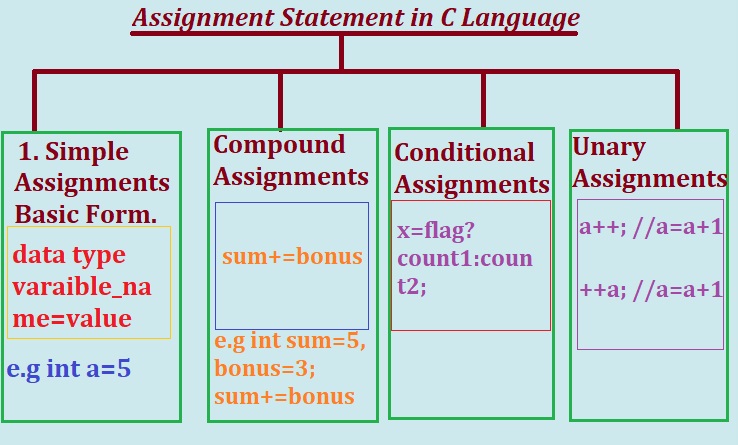
Syntax and Rules of Assignment Statements
Syntax 1: Basic Assignment Statement
Here is the general shape of every assignment statement:
Data_Type Variable_name = value;The value on the right can be a constant, a variable, or a whole expression. It gets evaluated first, and the result is stored in the variable on the left. For example:
int a = 9;          /* constant on the right */
int b = a;          /* variable on the right */
int c = a + b;      /* expression on the right */
Naming Rules for Assignment Statements
A few rules apply to any C statement, including assignment. Break one and your program won't compile:
- Variable names can't start with a digit. Start with a letter or an underscore.
- Assigning a new value to a variable replaces the old value — the old value is gone.
- The data type on the left must be compatible with the value on the right.
- Every statement ends with a semicolon (
;). - Use meaningful names like
totaloruser_age, notx1ortemp2. - You can't declare two variables with the same name in the same scope.
1. Simple Assignment (Basic Form)
The simplest form is one variable, one value, one line:
int a;
a = 9;
You can also declare and assign at the same time:
int a = 9;Both do the same thing. Most C programmers use the second form.
A slightly bigger example
#include <stdio.h>

int main()
{
    int a = 9;
    int c = 10;
    int b = c;         /* b gets a copy of c's value */

    printf("a = %d\n", a);
    printf("b = %d\n", b);
    printf("c = %d\n", c);

    return 0;
}
Output:
a = 9
b = 10
c = 10
After these three lines: a is 9, c is 10, and
b is also 10 (it copied c's value). Change
c later and b stays at 10.
You can also assign the result of an expression. C evaluates the right side first, then stores the result:
int a = 9;
int c = 10;
int total = a + c + 5;    /* total = 24 */
float avg = (a + c) / 2.0; /* avg = 9.5 */
2. Compound Assignment (Overview)
Compound assignment operators do an operation and an assignment in one step.
Instead of writing x = x + 5;, you write x += 5;.
Same result, less typing.
The general form looks like this:
variable op= expression;

/* which is the same as */
variable = variable op expression;
C has ten of these. The common ones are
+=, -=, *=, /=, and
%=. The bitwise ones (&=, |=,
^=, <<=, >>=) are less common
but just as useful once you know them.
+= and friends actually work step by step.
3. Conditional Assignment
The ternary operator ?: lets you pick one of two values based on a
condition, all in a single line. It's a compact version of an
if..else statement that produces a value.
Here is the shape:
var = condition ? value_if_true : value_if_false;If the condition is true, C assigns the first value. If false, it assigns the second one.
Example: check for a leap year
/**
 * C program to check leap year using the conditional operator
 */
#include <stdio.h>

int main()
{
    int year;

    printf("Enter any year: ");
    scanf("%d", &year);

    (year % 4 == 0 && year % 100 != 0)
        ? printf("LEAP YEAR")
        : (year % 400 == 0)
            ? printf("LEAP YEAR")
            : printf("COMMON YEAR");

    return 0;
}
Output:
Enter any year
2004
LEAP YEAR
Notice this example prints instead of assigning. The same logic works for assignment — just put a variable on the left:
int marks = 72;
char *result = (marks >= 35) ? "Pass" : "Fail";
4. Unary Assignment
Unary assignment operators work on one variable and change it by 1. C has two:
the increment ++ and the decrement --.
Here are the four ways to write them:
x++;    /* use x, then add 1 */
++x;    /* add 1, then use x */
x--;    /* use x, then subtract 1 */
--x;    /* subtract 1, then use x */
The difference between prefix (++x) and postfix (x++)
matters when the variable is used inside a larger expression. On its own line,
they do the same thing.
For a full breakdown of prefix vs postfix with examples, see Increment and Decrement Operators in C.
Operator Precedence (Where Assignment Fits)
Assignment has the lowest precedence in C — only the comma operator sits below it.
This means the entire right side gets evaluated before the value is stored. That is
why a = b + c * 2; computes b + (c * 2) first, then assigns.
| Precedence | Operators | Associativity |
|---|---|---|
| High | * / % | Left to right |
| Medium | + - | Left to right |
| Low | < > <= >= | Left to right |
| Lower | && || | Left to right |
| Lowest | = += -= *= /= %= | Right to left |
The "right to left" at the bottom is important — it's why
a = b = c = 5; works. C evaluates c = 5 first, then
b = (c = 5), then a = (b = (c = 5)). All three end up
holding 5.
Complete C Program: All Assignment Operators
Let's put it all together. The program below shows every assignment operator in C in a single run. Read through it once, then try to predict each line's output before you execute it.
#include <stdio.h>

int main()
{
    /* Simple Assignment */
    int x, i;
    int y, j;
    float c = 30.0;
    float d = 5.0;

    /* Nested or Multiple Assignment */
    x = i = 5;
    y = j = 3;

    /* Compound Assignment */
    x += y;
    printf("After Add and Assign :%d \n", x);

    i -= j;
    printf("After Subtract and Assign :%d \n", i);

    x *= y;
    printf("After Multiple and Assign :%d \n", x);

    c /= d;
    printf("After Divide and Assign :%f \n", c);

    j %= i;
    printf("After Modulo and Assign :%d \n", j);

    j &= i;
    printf("After Bitwise And and Assign :%d \n", j);

    j |= i;
    printf("After Bitwise OR and Assign :%d \n", j);

    x ^= y;
    printf("After Bitwise XOR and Assign :%d \n", x);

    x <<= 2;
    printf("After Bitwise Left Shift and Assign :%d \n", x);

    x >>= 3;
    printf("After Bitwise Right Shift and Assign :%d \n", x);

    return 0;
}
Output:
After Add and Assign :8
After Subtract and Assign :2
After Multiple and Assign :24
After Divide and Assign :6.000000
After Modulo and Assign :1
After Bitwise And and Assign :0
After Bitwise OR and Assign :2
After Bitwise XOR and Assign :27
After Bitwise Left Shift and Assign :108
After Bitwise Right Shift and Assign :13
If you got all ten right, you understand assignment. If some surprised you, those are the ones to study more closely.